Your workflow is unique 👨💻 - tell us how you use Dropbox here.
Forum Discussion

JamesCyon
1 month agoExplorer | Level 4
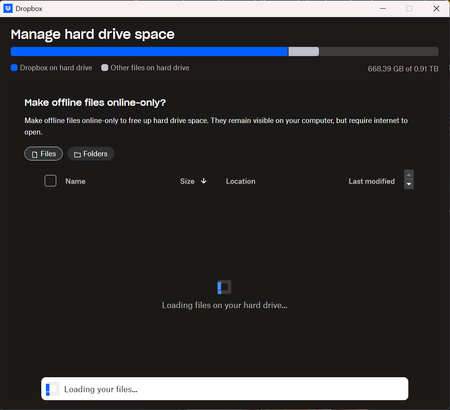
'Manage Hard Drive Space' folder information not loading on the desktop app preferences
Dropbox Plan Business Standard Device 13th Gen Intel(R) Core(TM) i5-13400F (2.50 GHz) Operating System/Browser (if using the web) Windows 11 home Dropbox App Version (if using the app) 239...

JamesCyon
1 month agoExplorer | Level 4
Just don't understand why it would stop working when that number of files has not changed drastically in the last 3 years...?
What can I do if I cannot reduce that number, a lot of the folders I have selectively synced to my machine I need access to.
- Nancy1 month ago
Dropbox Community Moderator
Hi again, James! So, to clarify, you were able to load your files at the “Manage Hard Drive Space” page about a month ago, even though you still had about 1.4 million files on your desktop app, correct?
In general, the 300k files mentioned here is a soft limit and having more than that on your Dropbox app can occasionally cause performance issues.
In this case, one thing that I can perhaps suggest is to reinstall the Dropbox app (without uninstalling first) with the help of this page.
Other than that, I'm afraid that there isn't much more we can offer, since having too many files in the local Dropbox folder is most likely the root cause of this issue.

About Storage Space
Looking for help with managing the storage space in your Dropbox account? Talk to the Dropbox Community and get advice from members.
The Dropbox Community team is active from Monday to Friday. We try to respond to you as soon as we can, usually within 2 hours.
If you need more help you can view your support options (expected response time for an email or ticket is 24 hours), or contact us on X, Facebook or Instagram.
For more info on available support options for your Dropbox plan, see this article.
If you found the answer to your question in this Community thread, please 'like' the post to say thanks and to let us know it was useful!


