We’re Still Here to Help (Even Over the Holidays!) - find out more here.
Forum Discussion

MikeRuth
2 years agoExplorer | Level 4
Over qouta and no idea why-or how
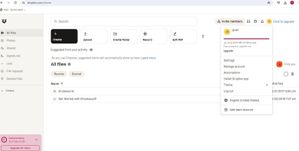
I have attached a screen shot of my clients DB. it indicates she has 32Gigs of data yet there are no files or folders in it. I have deleted the trash permanently. As you can see there are just two fi...

Jay Dropbox Community Moderator
2 years agoDropbox Community ModeratorThe app wouldn't direct you to the backup, as it's only visible from the site.
Regarding your second question, when you setup a backup, the app tries to backup the selected folders, regardless if your account has the quota for them. Once it reaches the limit, it'll generate the message about quota.

MikeRuth
2 years agoExplorer | Level 4
Thank you but I do trust that you saw in my post it was 32 GB. Does not make sense to me that the program would allow a backup if it's more than 2GB on a free account.
I actually do have a thought it's a monetary ploy in their marketing.
About Storage Space
Looking for help with managing the storage space in your Dropbox account? Talk to the Dropbox Community and get advice from members.
The Dropbox Community team is active from Monday to Friday. We try to respond to you as soon as we can, usually within 2 hours.
If you need more help you can view your support options (expected response time for an email or ticket is 24 hours), or contact us on X, Facebook or Instagram.
For more info on available support options for your Dropbox plan, see this article.
If you found the answer to your question in this Community thread, please 'like' the post to say thanks and to let us know it was useful!


