Your workflow is unique 👨💻 - tell us how you use Dropbox here.
Forum Discussion

Lageole
2 years agoHelpful | Level 5
Real folder size won't show in Finder
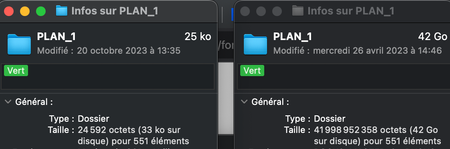
Hello, I am looking to resolve an issue I'm just experiencing now for the first time. When I do a command + i to see the size of a dropbox folder on my finder, the finder now just show me the s...

Jay Dropbox Community Moderator
2 years agoDropbox Community ModeratorHi Lageole, thanks for messaging the Community.
In general, the size on disk would be the files physically stored on the computer using the available offline option, and the size would be the logical size (if all the files were local).
As you're not seeing this, are you certain that none of the files have changed on the Dropbox site?
This will help me to assist further!

Lageole
2 years agoHelpful | Level 5
Hello Jay,
Thank you for your answer !
Before this problem occured (this week), I was always seing the full size of the folder (and in parenthesis the space it is taking localy). It was a really great things as the finder and folders were acting as any other folder of my computer. It was also really helpful to understand the size of folder even if they are not offline and also to perfom clone backups.
Right now, on the example / screencaps I showed, I guess it is acting logicaly (25ko) as all the files are online. There has been no modification from the dropbox site. My struggle is that I would want to see the real size of the folder, wether it is online or offline (as that was the case since I'm using dropbox).
I don't know if it is clear, I'm sorry this is a really abstract problem to describe !
- Jay2 years ago
What setting do you have on this page for Online-only files on Mac?
- Lageole2 years agoHelpful | Level 5
Ok my page is in french but I supposed we are talking about this :
"Online files on the Mac
In the Finder on the Mac, files stored online will display "zero bytes", making it easy to spot files that are taking up space on the hard disk."
If yes, I have it disabled !
Should I activate it ?
Thank you !- Jay2 years ago
Yes, please could you activate it to see if this helps with the display.
About Storage Space
Looking for help with managing the storage space in your Dropbox account? Talk to the Dropbox Community and get advice from members.
The Dropbox Community team is active from Monday to Friday. We try to respond to you as soon as we can, usually within 2 hours.
If you need more help you can view your support options (expected response time for an email or ticket is 24 hours), or contact us on X, Facebook or Instagram.
For more info on available support options for your Dropbox plan, see this article.
If you found the answer to your question in this Community thread, please 'like' the post to say thanks and to let us know it was useful!


