Your workflow is unique 👨💻 - tell us how you use Dropbox here.
Forum Discussion

jonsymbolgoodman
2 years agoExplorer | Level 3
Shared Page and Plan Page Don't Agree
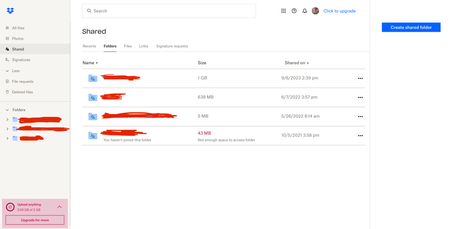
Could someone clarify why the Shared page and Plan page don't agree? Shared shows everything that's been shared with the account, right? Which by what's shown on screen is something like 1.7 GB....

Jay Dropbox Community Moderator
2 years agoDropbox Community ModeratorHi jonsymbolgoodman, thanks for bringing this to our attention.
The sharing tab might show an approximate amount of data for sizes over 1 GB.
You can calculate the exact size of the folders by following these steps. I'd recommend checking the first folder which shows 1 GB in total on that page.
Keep me updated with any details!
 jonsymbolgoodman2 years agoExplorer | Level 3
Thanks -- I'll try that. ...but could it really be off by nearly half a Gig? 🤔
- jonsymbolgoodman2 years agoExplorer | Level 3
- Jay2 years ago
You'll need to go to the parent folder above this folder, and then click the ellipsis that appears on the right.
- jonsymbolgoodman2 years agoExplorer | Level 3
Jay...there is no folder 'above' that -- the three folders shared with me are there in the side menu and also mid-screen.
About Storage Space
Looking for help with managing the storage space in your Dropbox account? Talk to the Dropbox Community and get advice from members.
The Dropbox Community team is active from Monday to Friday. We try to respond to you as soon as we can, usually within 2 hours.
If you need more help you can view your support options (expected response time for an email or ticket is 24 hours), or contact us on X, Facebook or Instagram.
For more info on available support options for your Dropbox plan, see this article.
If you found the answer to your question in this Community thread, please 'like' the post to say thanks and to let us know it was useful!


