Your workflow is unique 👨💻 - tell us how you use Dropbox here.
Forum Discussion

jonsymbolgoodman
2 years agoExplorer | Level 3
Shared Page and Plan Page Don't Agree
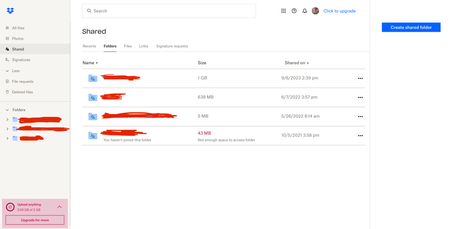
Could someone clarify why the Shared page and Plan page don't agree? Shared shows everything that's been shared with the account, right? Which by what's shown on screen is something like 1.7 GB....

jonsymbolgoodman
2 years agoExplorer | Level 3

Jay Dropbox Community Moderator
2 years agoDropbox Community ModeratorYou'll need to go to the parent folder above this folder, and then click the ellipsis that appears on the right.
- jonsymbolgoodman2 years agoExplorer | Level 3
Jay...there is no folder 'above' that -- the three folders shared with me are there in the side menu and also mid-screen.
- Jay2 years ago
The ellipsis should be on the right then when you hover over the folder, like so:
- jonsymbolgoodman2 years agoExplorer | Level 3
So the folder above which is displaying as having 1 GB in Shared, actually has 1.45 GB in it which is only visible if you drill down to find that data, folder by folder. This is extremely disappointing because it's as if Dropbox would rather not be clear about how much storage you're using so you'll go over on purpose.
This has kept me from doing my full job for weeks, trying to figure out where the problem was. If you can display 638 MB, then you can display 1.5 GB in the same read out, and make it easier for people to manage what is going on in their account.
I still don't know why my total is different from others who are accessing the same files, but at least I have a little more information to go on...
Ultimately it is true: the Shared page and Plan page don't display the same things, even if they are labeled as the same things.
About Storage Space
Looking for help with managing the storage space in your Dropbox account? Talk to the Dropbox Community and get advice from members.
The Dropbox Community team is active from Monday to Friday. We try to respond to you as soon as we can, usually within 2 hours.
If you need more help you can view your support options (expected response time for an email or ticket is 24 hours), or contact us on X, Facebook or Instagram.
For more info on available support options for your Dropbox plan, see this article.
If you found the answer to your question in this Community thread, please 'like' the post to say thanks and to let us know it was useful!


