Your workflow is unique 👨💻 - tell us how you use Dropbox here.
Forum Discussion

peteraschindler60
2 months agoExplorer | Level 3
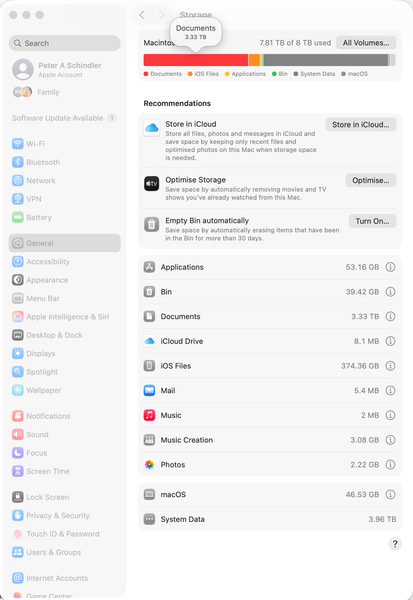
The System Data on my macOS computer shows 7.9TB used when it's not
Dropbox Plan Business Standard Device MacBook Pro 14" Nov 2024 Operating System/Browser (if using the web) Mac OS Tahoe 26.0.1 Dropbox App Version (if using the app) 238.4.6075
Question or ...

Vicker Super User
2 months agoSuper UserHi peteraschindler60 ,
I am a long-time heavy macOS Dropbox user as well and have never come across any double-count issue. Note that the "System Data" under macOS Storage is not directly equivalent to the "System" folder. I bet if you try to check the "Library" folder, you may be able to locate a large amount of usage somewhere.
For that, you may wanna find other tools out there in the market to help you, e.g. Daisy Disk, MacKeeper, CleanMyMac, etc... Some of these tools can even help to clean out some unusable system files like installer, caches, etc.
Cheers
Vicker
 peteraschindler602 months agoExplorer | Level 3
Hello Vicker,
thanks for replying. I've checked that already but it doesn't look like it:
Here is further evidence that something odd is going on:
In System Storage it shows 7.81TB of 8TB meaning 190GB still free.
- In the Finder, I can take a large file (e.g., an FCP library) that is > the 190GB available and copy (duplicate) it: concrete example, I can duplicate a 450GB file which, technically, I shouldn't be able to do if only 190GB is available, right?
- However, when I connect my iPhone 16 Pro with 1TB of memory (of which around 420GB used) and want to back it up to my Macbook, it runs for a while and then says: sorry, out of storage!
It seems to me that the 1) Finder copy process uses one OS systems call to determine size of remaining storage; and the 2) iPhone back-up process uses another OS systems call. Or some such thing.
Furthermore, I have an older Macbook pro also running Tahoe with the same dropbox (Personal) and dropbox (business), but only 4TB of storage, and it all tallies up perfectly. What's more System Data shows the same size as that when I look at it in the finder.
So, what could be the problem?
Thank you, all!
Peter
- Hannah2 months ago
Dropbox Community Moderator
Hey peteraschindler60, thanks for reaching out to the Dropbox Community.
This does look strange indeed, and sorry if I missed something, but can I ask why you think that your Dropbox files are the culprit here?
 peteraschindler2 months agoNew member | Level 2
Hello Hannah,
a fair question, but it is this:
- I bought the Macbook new; I had, more or less 8TB free space (except for system files and some apps).
- I then synced my 2 Dropbox account files (Personal and company). By the time it was done, the problem, as described, presented itself.
Please feel free to ask any other questions if you think I missed something. Thank you!
Peter

About Storage Space
Looking for help with managing the storage space in your Dropbox account? Talk to the Dropbox Community and get advice from members.
The Dropbox Community team is active from Monday to Friday. We try to respond to you as soon as we can, usually within 2 hours.
If you need more help you can view your support options (expected response time for an email or ticket is 24 hours), or contact us on X, Facebook or Instagram.
For more info on available support options for your Dropbox plan, see this article.
If you found the answer to your question in this Community thread, please 'like' the post to say thanks and to let us know it was useful!


