Your workflow is unique 👨💻 - tell us how you use Dropbox here.
Forum Discussion

peteraschindler60
2 months agoExplorer | Level 3
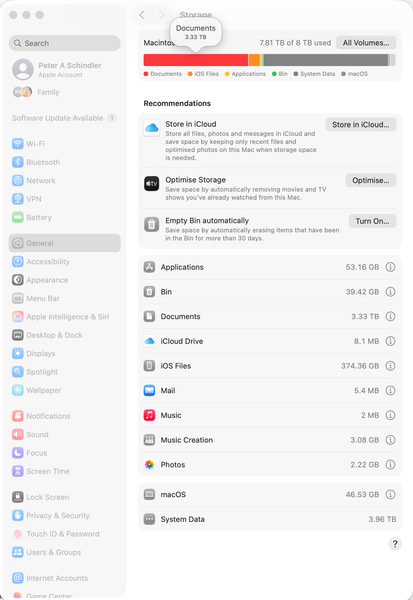
The System Data on my macOS computer shows 7.9TB used when it's not
Dropbox Plan Business Standard Device MacBook Pro 14" Nov 2024 Operating System/Browser (if using the web) Mac OS Tahoe 26.0.1 Dropbox App Version (if using the app) 238.4.6075
Question or ...

peteraschindler
2 months agoNew member | Level 2
Hello Hannah,
a fair question, but it is this:
- I bought the Macbook new; I had, more or less 8TB free space (except for system files and some apps).
- I then synced my 2 Dropbox account files (Personal and company). By the time it was done, the problem, as described, presented itself.
Please feel free to ask any other questions if you think I missed something. Thank you!
Peter

Hannah Dropbox Community Moderator
2 months agoDropbox Community ModeratorThanks for the reply, Peter.
Would you mind right/control-clicking on each Dropbox folder (both personal and team) and sending me a screenshot of the "get info" section for each?
Are the files in both folders set to online-only?
If they are and they appear to be taking up space, make sure to check that you've also enabled the "Online-only files on Mac" setting here.
About Storage Space
Looking for help with managing the storage space in your Dropbox account? Talk to the Dropbox Community and get advice from members.
The Dropbox Community team is active from Monday to Friday. We try to respond to you as soon as we can, usually within 2 hours.
If you need more help you can view your support options (expected response time for an email or ticket is 24 hours), or contact us on X, Facebook or Instagram.
For more info on available support options for your Dropbox plan, see this article.
If you found the answer to your question in this Community thread, please 'like' the post to say thanks and to let us know it was useful!


