Your workflow is unique 👨💻 - tell us how you use Dropbox here.
Forum Discussion

peteraschindler60
2 months agoExplorer | Level 3
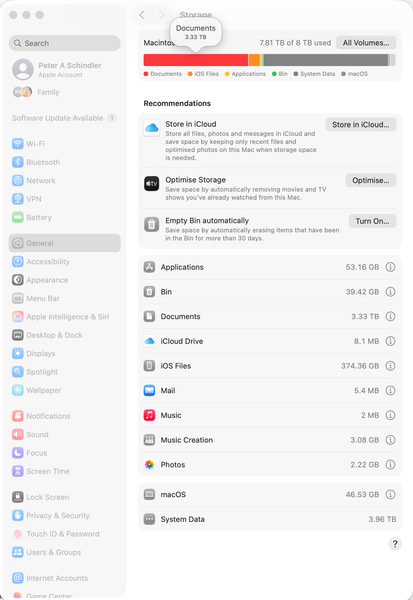
The System Data on my macOS computer shows 7.9TB used when it's not
Dropbox Plan Business Standard Device MacBook Pro 14" Nov 2024 Operating System/Browser (if using the web) Mac OS Tahoe 26.0.1 Dropbox App Version (if using the app) 238.4.6075
Question or ...

peteraschindler
2 months agoNew member | Level 2
Hello Hannah,
here I am again:
"Are the files in both folders set to online-only?" 1) The reason why I bought the Mac with 8TB SSD is that I need everything offline. 2) But, because of the issue I face, I had to put set infrequently used folders to online-only.
Those that are set to online-only are do NOT take up any space. Here is an example:
The first 4 are set to online-only; the remaining 2 are set to "offline".
As regards the screen shots you requested, please see below. If you need more, please let me know.
I really appreciate your help.
Cheers,
Peter
Screen shots:
In addition to the 2 Dropbox folders, I'm also giving you screen prints of the Mac HD sub-folders. If you tally it all up, you will see that it doesn't even come close to 8TB, and yet
Overview of what I'm including
The 8 screen shots:
- Jay2 months ago
Dropbox Community Moderator
Hi peteraschindler, thanks for the images. At this point it might be better for the support team to look into this in more detail.
You can contact them directly via this link, and they'll be able to investigate further.- peteraschindler2 months agoNew member | Level 2
Noted. Sadly my experience with the Dropbox support team has been miserable, but I suppose I'll have to give it another go.
- Hannah2 months ago
Sorry to hear about that, Peter and thanks for your sincere feedback.
If you've opened up a new ticket with our team, please give us the ticket number, so we can track it on our end as well.


About Storage Space
Looking for help with managing the storage space in your Dropbox account? Talk to the Dropbox Community and get advice from members.
The Dropbox Community team is active from Monday to Friday. We try to respond to you as soon as we can, usually within 2 hours.
If you need more help you can view your support options (expected response time for an email or ticket is 24 hours), or contact us on X, Facebook or Instagram.
For more info on available support options for your Dropbox plan, see this article.
If you found the answer to your question in this Community thread, please 'like' the post to say thanks and to let us know it was useful!


