Your workflow is unique 👨💻 - tell us how you use Dropbox here.
Forum Discussion

peteraschindler60
2 months agoExplorer | Level 3
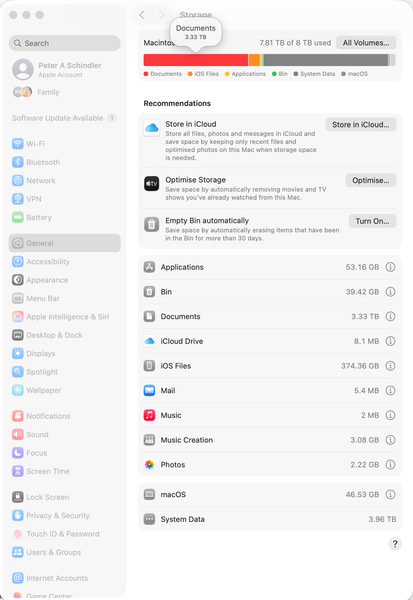
The System Data on my macOS computer shows 7.9TB used when it's not
Dropbox Plan Business Standard Device MacBook Pro 14" Nov 2024 Operating System/Browser (if using the web) Mac OS Tahoe 26.0.1 Dropbox App Version (if using the app) 238.4.6075
Question or ...

jameswalker
2 months agoNew member | Level 2
This does sound very frustrating especially with such a large SSD. It looks like system data may be counting cached or synced files twice. Dropbox local storage and indexing can sometimes inflate system data. A rebuild or reset may help but it is hard to know without clear guidance. Hopefully someone has seen this exact case and can confirm a fix.

peteraschindler
2 months agoNew member | Level 2
Hello jameswalker,
that is exactly what I suspect is happening. I need an expert in the Dropbox Support team to help confirm that this is what is going on.
In the meantime, thank you all for your constructive replies.
Cheers,
Peter
About Storage Space
Looking for help with managing the storage space in your Dropbox account? Talk to the Dropbox Community and get advice from members.
The Dropbox Community team is active from Monday to Friday. We try to respond to you as soon as we can, usually within 2 hours.
If you need more help you can view your support options (expected response time for an email or ticket is 24 hours), or contact us on X, Facebook or Instagram.
For more info on available support options for your Dropbox plan, see this article.
If you found the answer to your question in this Community thread, please 'like' the post to say thanks and to let us know it was useful!


