Our Community is in read-only mode until April 8th, learn more here. You can still search existing threads or get help via Dropbox Support, the Dropbox Help Center, or Learn.
Forum Discussion

Nisha Banerjee
4 years agoHelpful | Level 5
What will happen if I delete all the program files of older versions from C drive of my computer?
Hello everyone!! I'm using Dropbox for a long time and I really satisfied with this app. But unfortunately, I'm facing one problem that it's making repeatedly new program files in each update with na...
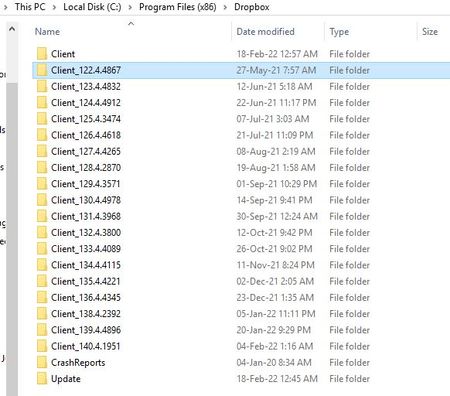
- 4 years agoHey Nisha Banerjee, sorry to jump in here, but I just wanted to mention that these are the desktop app's installation folders and you should be able to delete them without affecting anything else.
You can keep the folder for the version of the app you're currently using to be safe, just in case.

Walter Dropbox Community Moderator
4 years agoDropbox Community Moderator
Nisha Banerjee
4 years agoHelpful | Level 5
Oh it's okay Walter 🙂 Thank you for your help! 😌 I'll check and delete those files manually.  👍
👍
About Storage Space
Looking for help with managing the storage space in your Dropbox account? Talk to the Dropbox Community and get advice from members.
The Dropbox Community team is active from Monday to Friday. We try to respond to you as soon as we can, usually within 2 hours.
If you need more help you can view your support options (expected response time for an email or ticket is 24 hours), or contact us on X, Facebook or Instagram.
For more info on available support options for your Dropbox plan, see this article.
If you found the answer to your question in this Community thread, please 'like' the post to say thanks and to let us know it was useful!


