Your workflow is unique 👨💻 - tell us how you use Dropbox here.
Forum Discussion

Centristsalcaraz
1 month agoExplorer | Level 3
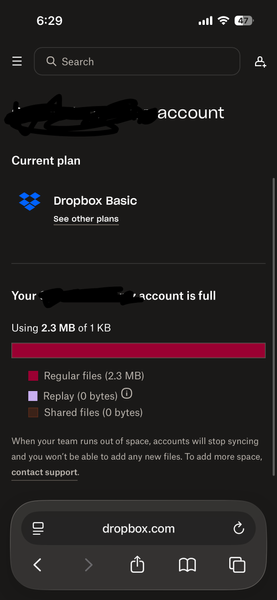
Why am I limited to 1 KB of quota?
Having an issue. How do I resolve?

Centristsalcaraz
1 month agoExplorer | Level 3
How did my account change and get locked? It was always set up as a personal basic. I created the account specifically for this single purpose.

Jay Dropbox Community Moderator
1 month agoDropbox Community ModeratorDid you recently join a Dropbox team or join a shared folder which added you to a Dropbox team?
Have you tried leaving the team using the steps provided in my previous message?
- Centristsalcaraz1 month agoExplorer | Level 3
No that’s the frustrating part. I literally set this up about a year ago, set it to sync my writing between devices and then haven’t touched it since. Been working flawlessly until 12/30 when suddenly it couldn’t sync because of insufficient storage space. So weird.
also I haven’t been able to follow the instructions because I cannot locate the option to delete or disband my team.
it’s as if my basic account is being treated as an expired team without actually being one.
im ready to scrap the whole thing and start over. But as I mentioned, I don’t know how to NOT replicate this in the future.
- Mark1 month ago
Super User II
Centristsalcaraz wrote:
my basic account is being treated as an expired team without actually being one.
It is a team. As the message says at some point you have joined a team.
Centristsalcaraz wrote:
I don’t know how to NOT replicate this in the future.
Dont join any teams - so read sharing emails carefully before accepting

About Storage Space
Looking for help with managing the storage space in your Dropbox account? Talk to the Dropbox Community and get advice from members.
The Dropbox Community team is active from Monday to Friday. We try to respond to you as soon as we can, usually within 2 hours.
If you need more help you can view your support options (expected response time for an email or ticket is 24 hours), or contact us on X, Facebook or Instagram.
For more info on available support options for your Dropbox plan, see this article.
If you found the answer to your question in this Community thread, please 'like' the post to say thanks and to let us know it was useful!


