Your workflow is unique 👨💻 - tell us how you use Dropbox here.
Forum Discussion

Centristsalcaraz
1 month agoExplorer | Level 3
Why am I limited to 1 KB of quota?
Having an issue. How do I resolve?

Jay Dropbox Community Moderator
1 month agoDropbox Community ModeratorIf you upgraded to a Dropbox Team trial, and then let it expire, then you would get into a locked state.
As you are the team admin, you could cancel and disband the team from this page, and it would return to a personal plan.

Centristsalcaraz
1 month agoExplorer | Level 3
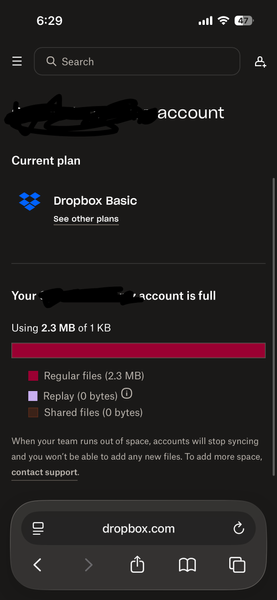
When I follow your link it takes me here. Staring my plan is basic and that my storage is full at 2.27mb.
as I stated before, I made no changes to my basic account. I set it up months ago and haven’t needed to log in because it is strictly used for automatic syncing my writing between devices.
I appreciate your time spent on this matter.
- Mark1 month ago
Super User II
Centristsalcaraz wrote:
Staring my plan is basic and that my storage is full at 2.27mb.
The pics are really helpful, thank you!.
That image also states that the Team account is inactive, which is what Jay said.
So at some point you have joined a Team which was a paid account (or trial) but that has been stopped. Try and follow these steps as has been said to get out of the Team account.
- Centristsalcaraz1 month agoExplorer | Level 3
Can someone share the instructions for disbanding or deleting a team? Having a hard time navigating the menus on mobile. Feels like I’m missing something
- Hannah1 month ago
Hey Centristsalcaraz, here are the steps on how to disband your team:
https://help.dropbox.com/account-access/team-locked-state#lockedstatedisbandteam
I hope this helps!


About Storage Space
Looking for help with managing the storage space in your Dropbox account? Talk to the Dropbox Community and get advice from members.
The Dropbox Community team is active from Monday to Friday. We try to respond to you as soon as we can, usually within 2 hours.
If you need more help you can view your support options (expected response time for an email or ticket is 24 hours), or contact us on X, Facebook or Instagram.
For more info on available support options for your Dropbox plan, see this article.
If you found the answer to your question in this Community thread, please 'like' the post to say thanks and to let us know it was useful!


