Our Community is in read-only mode until April 8th, learn more here. You can still search existing threads or get help via Dropbox Support, the Dropbox Help Center, or Learn.
Forum Discussion

Dario1250
3 years agoHelpful | Level 5
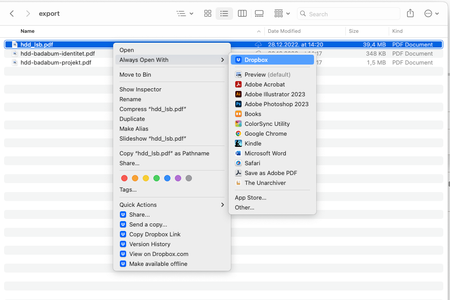
After latest Dropbox update, documents on Mac are set to open with Dropbox by default
MacBook Pro M1 with the MacOS Ventura 13.1 installed. I use the Dropbox Plus plan, and I predominantly access files through my Finder app. The Dropbox app notified me of the new update — I instal...

Ian J.10
3 years agoHelpful | Level 6
I have this exact same issue - also on a MacBook Pro M1 Pro.
Files that I right-click and set to "Make available offline" appear to download, a green tick appears, with the words "Available Offline" underneath. But if I double-click on the file it tries to open in Dropbox - and the Open With is set to open in Dropbox by default.
The update has broken my Dropbox workflow. 😢

Megan Dropbox Community Moderator
3 years agoDropbox Community ModeratorHi Ian J.10, happy Friday!
Which version of our app do you use on your end, and what is your OS?
Let me know more!
- Ian J.103 years agoHelpful | Level 6
Hi Megan. My set up is exactly the same as the original poster (MacBook Pro M1 with Ventura 13.1 running Dropbox v164.4.7914) and I have the exact same issue. 😊
 Andre_Leiva3 years agoExplorer | Level 4
Hi.
Same problem here!
The last few days have been a nightmare... Any solution?
Please, let me know how my dropbox can work well like before the update.
My setup is a MacBook Pro M1 with Ventura 13.1 running Dropbox v164.4.7914
About Apps and Installations
Have a question about a Dropbox app or installation? Reach out to the Dropbox Community and get solutions, help, and advice from members.
The Dropbox Community team is active from Monday to Friday. We try to respond to you as soon as we can, usually within 2 hours.
If you need more help you can view your support options (expected response time for an email or ticket is 24 hours), or contact us on X, Facebook or Instagram.
For more info on available support options for your Dropbox plan, see this article.
If you found the answer to your question in this Community thread, please 'like' the post to say thanks and to let us know it was useful!


