Our Community is in read-only mode until April 8th, learn more here. You can still search existing threads or get help via Dropbox Support, the Dropbox Help Center, or Learn.
Forum Discussion

Dario1250
3 years agoHelpful | Level 5
After latest Dropbox update, documents on Mac are set to open with Dropbox by default
MacBook Pro M1 with the MacOS Ventura 13.1 installed. I use the Dropbox Plus plan, and I predominantly access files through my Finder app. The Dropbox app notified me of the new update — I instal...

Dario1250
3 years agoHelpful | Level 5
Walter — thanks for the response! I've rebooted my computer as well as the Dropbox App to no effect.
Here's the status of the dropbox app (from the menu bar icon):
Everything seems fine and up to date. Here's some additional info I noticed in the meantime:
The files and folders that were "Available Offline" before i updated Dropbox and re-indexed all the files are fine.They behave as they should, and Dropbox is not on top of their "Open With" list.
The files and folders that were "Online Only" before the update and re-indexing are the ones behaving in the way I described:
- When I make them "Available Offline", they try to open with Dropbox on double-click.
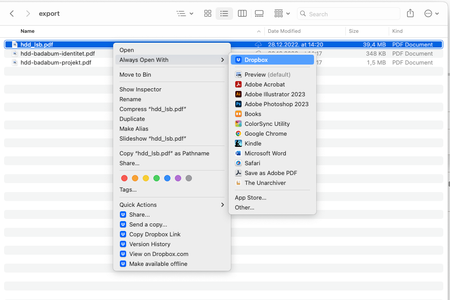
(I know this because if I quit the Dropbox Desktop App, double clicking any of these files will re-open it.) - Dropbox is on top of their "Open With" list, but the correct app still has "(default)" next to it. If I open the Inspector window, same thing. (See below.)
- Clicking "Open With" and selecting the correct application opens the file as it should, but doesn't fix the problem.
- Clicking "Always Open With" and selecting the correct application opens the file as it should and fixes the problem for that one individual file only, not the entire file type.
So, the upload and download work fine. The toggling between "Online Only" and "Available Offline" also shows no issues. No data is lost, the files work well. The only problem seems to be that the files that were "Online Only" before reindexing are now forever marked to be opened by Dropbox by default, while he files that were "Available Offline" before reindexing behave the same as before. I'm certain this part is key to the mystery somehow, I'm just not the detective to solve it.
Please, help!

Walter Dropbox Community Moderator
3 years agoDropbox Community ModeratorHi all, thank you for flagging this with us.
I just wanted to mention that our engineers are aware of the problem and are working on a solution.
Sorry for any inconvenience this is causing and we'll make sure to update you shortly on this issue.
 Ian J.103 years agoHelpful | Level 6
Super - thank you!
 Andre_Leiva3 years agoExplorer | Level 4
Hi, @Walter Thank you!
Have a good day.
 kartoone3 years agoNew member | Level 2
I am also having the same problem. M1 Mac with Ventura and updated to the latest version of Dropbox 164.4.7194
I've tried rebooting and tried "Open With" and then saying "Always open with", but it seems to default back to trying to open in Dropbox even though it says Word should be the default! I've also attached error message I am now starting to see when I just double-click anyway knowing that it won't open.
- Hannah3 years ago
Hey zjtest, I moved your post to this thread, which seems to reflect your issue.
Thanks for reaching out as well, kartoone.
As Walter mentioned previously in this thread, our engineers are aware of the situation and are currently working on resolving it.
Thanks for letting us know and we'll update you on this, once we have more info.
- Ian J.103 years agoHelpful | Level 6
Walter Any news? Its been a week and Dropbox is now unusable for me?
- bluemigrant3 years agoHelpful | Level 5
Seems like no progress until now. Another thread gives a solution to resolve the "Open with" problem, however, many files still have the "from an unindentified developer..." problem.
- Ian J.103 years agoHelpful | Level 6
Walter hannahb Dropboxers - is there any news on this issue? I am a paying customer, and use Dropbox for business, and it is still utterly unusable on my MacBook. It is significantly affecting my ability to do my job. This issue was raised 3 weeks ago, and my Dropbox has updated version since then, but I still have the issue.
Please update here as a matter of urgency. I will start to ask for a refund soon as the product does not work as advertised.

About Apps and Installations
Have a question about a Dropbox app or installation? Reach out to the Dropbox Community and get solutions, help, and advice from members.
The Dropbox Community team is active from Monday to Friday. We try to respond to you as soon as we can, usually within 2 hours.
If you need more help you can view your support options (expected response time for an email or ticket is 24 hours), or contact us on X, Facebook or Instagram.
For more info on available support options for your Dropbox plan, see this article.
If you found the answer to your question in this Community thread, please 'like' the post to say thanks and to let us know it was useful!


