Our Community is in read-only mode until April 8th, learn more here. You can still search existing threads or get help via Dropbox Support, the Dropbox Help Center, or Learn.
Forum Discussion

Dario1250
3 years agoHelpful | Level 5
After latest Dropbox update, documents on Mac are set to open with Dropbox by default
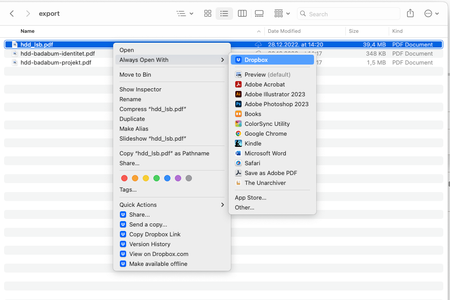
MacBook Pro M1 with the MacOS Ventura 13.1 installed. I use the Dropbox Plus plan, and I predominantly access files through my Finder app. The Dropbox app notified me of the new update — I instal...

Hannah Dropbox Community Moderator
3 years agoDropbox Community ModeratorHey Ian J.10, sorry to see you're having this issue.
Do you have the most recent version of the Dropbox application installed on your computer?
If not, make sure to update the app, to see if that helps.

Ian J.10
3 years agoHelpful | Level 6
Thanks Hannah. Just manually updated and it seems to be fine now. It appears that the Dropbox updater does not update very frequently!
For everyone else, this issue seems to be resolved in version 165.4.4300 which was released on January 12th. If you're Dropbox hasn't updated yet then downloading the installer works.
- Hannah3 years ago
Thanks for the update, Ian!
I'm happy to see that this was resolved for you after updating the Dropbox app.
If you need anything else, make sure to let us know.
 kartoone3 years agoNew member | Level 2
I have also updated to 165.4.4300 and Office documents are opening again in the correct apps (Word, Powerpoint, etc...) instead of dropbox.com.
 Fildar422 years agoExplorer | Level 3
Hello, I'm using a MBA M1 with the latest version of dropbox v182.4.6427 and I still have the same issue with the dropbox.app which is set as the default app to open all my files (PDF, DOC, XLS, etc...). The so called update of January did not fix the bad behavior.
Moreover, I need to set the default app not for each type of file, but for EACH file and after some times, the dropbox.app is again the default app to open the files.
This is very annoying. Could you please fix this? Am is the only one who still have this problem?
Thanks for your help
- Walter2 years ago
Hey Fildar42, sorry to hear you're having issues with this.
May I ask if you've tried reinstalling the desktop app since you first noticed this?
If you did and this persists, you can try getting in touch with our support team so that they can assist further with account and device specific information.
In any case, please keep us posted!
- Fildar422 years agoExplorer | Level 3
Hello, following your recommandation, I uninstalled Dropbox, restart and try to install it. Now, I can no longer start Dropbox. I have an error message
- Fildar422 years agoExplorer | Level 3
OK but it seems the file contains personnel data and don't want to share it on this thread. How can I transfer it privately?
- Fildar422 years agoExplorer | Level 3
I succeed to reinstall dropbox after deleting the ./.dropbox directory. I will see if the problem with the default app dropbox.app still exists
- Fildar422 years agoExplorer | Level 3
Hi, it seems the reinstallation fix the problem. I no longer have the dropbox.app as the default application to read XLS, DOC and PDF files.
Thanks for the help
Regards

About Apps and Installations
Have a question about a Dropbox app or installation? Reach out to the Dropbox Community and get solutions, help, and advice from members.
The Dropbox Community team is active from Monday to Friday. We try to respond to you as soon as we can, usually within 2 hours.
If you need more help you can view your support options (expected response time for an email or ticket is 24 hours), or contact us on X, Facebook or Instagram.
For more info on available support options for your Dropbox plan, see this article.
If you found the answer to your question in this Community thread, please 'like' the post to say thanks and to let us know it was useful!


