We’re Still Here to Help (Even Over the Holidays!) - find out more here.
Forum Discussion

netikras
9 months agoNew member | Level 2
Cannot sign-in to the desktop app. It redirects me and throws an errors in the browser console.
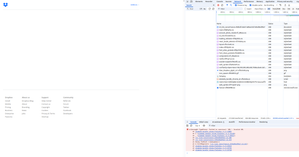
For a few weeks now, I've been struggling to sign in my desktop app. When I click on sign-in in the tray icon, I'm redirected to an SSO webpage and it shows but a blank:
In browser's conso...
 9 months ago
Hello Nancy , thank you for your suggestion.
Just today, I was setting up a new laptop and had the same issue there.
However, I think I found what is wrong. It's this: https://chromewebstore.google.com/detail/dark-mode/dmghijelimhndkbmpgbldicpogfkceaj . I installed this extension a while ago and permitted it to run incognito.
After reading your message, I attached a debugger in Chrome's dev tools to see what's causing this "Invalid URL". One of the nodes did not have the href value, which I found odd, because that element also had its ID set to `#dark-mode-custom-link`. And if it were a Dropbox issue, others would be having it too... So the node ID hinted me the possible extension that could be intervening. After disabling it the nonce webpage loaded perfectly fine.
Thank you for your time and effort helping me!
netikras
9 months agoNew member | Level 2
Hi, Megan !
Thanks for your reply.
Is this a new installation on your device?
nope, I've been using that laptop for around a year already. It stopped working for me after one of the reboots (I reboot rarely, every few months), like ~2 months ago. Naturally, I need to sign in the applet after booting up the OS. And this is where it's failing now. It generates the nonce link, redirects me to the browser (chrome) just fine, it's just that the browser fails to load that link.
have you made sure that all the necessary requirements are met
yepp, I'm on LinuxMint which is ubuntu-based. And as I said before, it's been working perfectly fine for over half a year, until it stopped.
if you open your browser, and try to sign into your account without the app, do you face any issues?
Nope, no issues there. So far, only that nonce link is giving me trouble, nothing more.

Megan Dropbox Community Moderator
9 months agoDropbox Community ModeratorHey netikras, thanks for the speedy response!
Have you tried uninstalling the app entirely, and then reinstalling it? Feel free to take a look at this helpful article too.
- netikras9 months agoNew member | Level 2
Yepp, I tried that. I uninstalled and tried another version (from nix repositories, in non-GUI mode -- it was generating the nonce URL just fine like it does now, but the URL was NOT loading well in browser), but that didn't work either.
I then reinstalled dropbox back from the official repos.- Nancy9 months ago
netikras, can you try an advanced reinstall as the next step and let me know if it helps?
Other than that, you can also create a second user profile and check if the issue persists there, as well.
- netikras9 months agoNew member | Level 2
Hello Nancy , thank you for your suggestion.
Just today, I was setting up a new laptop and had the same issue there.
However, I think I found what is wrong. It's this: https://chromewebstore.google.com/detail/dark-mode/dmghijelimhndkbmpgbldicpogfkceaj . I installed this extension a while ago and permitted it to run incognito.
After reading your message, I attached a debugger in Chrome's dev tools to see what's causing this "Invalid URL". One of the nodes did not have the href value, which I found odd, because that element also had its ID set to `#dark-mode-custom-link`. And if it were a Dropbox issue, others would be having it too... So the node ID hinted me the possible extension that could be intervening. After disabling it the nonce webpage loaded perfectly fine.
Thank you for your time and effort helping me!

About Apps and Installations
Have a question about a Dropbox app or installation? Reach out to the Dropbox Community and get solutions, help, and advice from members.
The Dropbox Community team is active from Monday to Friday. We try to respond to you as soon as we can, usually within 2 hours.
If you need more help you can view your support options (expected response time for an email or ticket is 24 hours), or contact us on X, Facebook or Instagram.
For more info on available support options for your Dropbox plan, see this article.
If you found the answer to your question in this Community thread, please 'like' the post to say thanks and to let us know it was useful!


