Your workflow is unique 👨💻 - tell us how you use Dropbox here.
Forum Discussion

DeadlyEspresso
2 years agoExplorer | Level 3
can't delete dropbox filepath from Windows Explorer
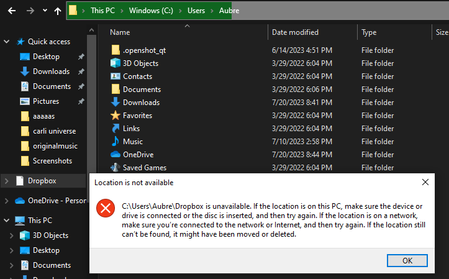
I'm having an issue with trying to uninstall Dropbox from Windows. While I was able to correctly remove the application from Windows using its uninstaller, it did leave behind this weird "drop...

Jay Dropbox Community Moderator
2 years agoDropbox Community ModeratorHi DeadlyEspresso, thanks for bringing this to our attention.
Have you already tried rebooting your computer entirely after uninstalling the Dropbox desktop application?
This will help me to assist further!

DeadlyEspresso
2 years agoExplorer | Level 3
(For Jay )
I tried restarting my computer, but the broken "Dropbox" file path still persists. I also did check my list of programs, and I can confirm that Dropbox had been successfully uninstalled in the past. If restarting the computer doesn't remove the broken "Dropbox" file path, what should I do next?
- Walter2 years ago
Hey DeadlyEspresso, sorry to jump in, but I just wanted to mention that this seems like a reparse point, probably leftover from the uninstalling process.
Have you tried right clicking on it and deleting from there?
Do you get any errors if you do?
- DeadlyEspresso2 years agoExplorer | Level 3
(For Walter)
Unfortunately, no. Right clicking on the "dropbox" file path does not display any option to delete it. Trying to delete the file path by placing it in the Recycling Bin does nothing as well.

About Apps and Installations
Have a question about a Dropbox app or installation? Reach out to the Dropbox Community and get solutions, help, and advice from members.
The Dropbox Community team is active from Monday to Friday. We try to respond to you as soon as we can, usually within 2 hours.
If you need more help you can view your support options (expected response time for an email or ticket is 24 hours), or contact us on X, Facebook or Instagram.
For more info on available support options for your Dropbox plan, see this article.
If you found the answer to your question in this Community thread, please 'like' the post to say thanks and to let us know it was useful!


