Our Community is currently in read-only mode, learn more here. You can still search existing threads or get help via Dropbox Support, the Dropbox Help Center, or Learn.
Forum Discussion

agj60
4 years agoExplorer | Level 4
Can't install Dropbox on Mac M1 with macOS Monterey
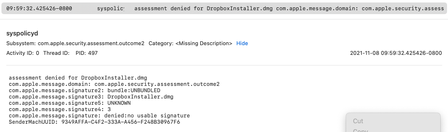
The installer just doesn't start. Digging on console I found this:
Apparently is a problem with its signature.
Any help?

Jay Dropbox Community Moderator
4 years agoDropbox Community ModeratorHi agj60, thanks for posting today.
Could you try downloading and installing the offline installer from this link?
Keep me updated with any progress!
Could you try downloading and installing the offline installer from this link?
Keep me updated with any progress!
 agj604 years agoExplorer | Level 4
Oddly enough, the original installer mounted as a volume, even if not launching directly from the .dmg file. From the mounted volume I was then able to install it.
 riauu4 years agoExplorer | Level 4
Hello,
ISSUE:
I am unable to install and run Dropbox, even with using the link you provided.
CONTEXT:
I am on a brand new 14-inch MacBook Pro 2021, running on macOS Monterey 12.1, and trying to install Dropbox for the first time on this device. (I've been using in for years, and it's still working well on my old MacBook Pro and on my other devices).
FAIL #1:
The installer never opens the file (Dropbox 134.4.4115.dmg) I've downloaded from the Dropbox website here.
FAIL #2:
Using the link you provided in this post, I was finally able to at least get the application to unpack and start the installation, BUT -- it stops mid configuration! After entering 2-step auth the security code, I am being notified that I am using an old version of Dropbox, and to download the new version (the link that's provided is the one I originally used for fail #1). It doesn't let me proceed with the installation and configuration.
I am in desperate need of being able to use Dropbox off-browser, as before. Please advise, and thanks in advance!
 Edmos4 years agoExplorer | Level 4
I had the same problem on MacOS 12.2 and reinstalling via the file you provided worked. Thanks.
 Cosmobeard4 years agoNew member | Level 2
Same thing happened to me a comment ago. (on Mac OS 12.2 as well).
The DropboxInstaller.dmg does nothing when I either double click or right click/open. The version that the CS agent linked in this post did open when double clicking. I'm on an M1Max so maybe it's an Apple Silicone issue.

About Apps and Installations
Have a question about a Dropbox app or installation? Reach out to the Dropbox Community and get solutions, help, and advice from members.
The Dropbox Community team is active from Monday to Friday. We try to respond to you as soon as we can, usually within 2 hours.
If you need more help you can view your support options (expected response time for an email or ticket is 24 hours), or contact us on X, Facebook or Instagram.
For more info on available support options for your Dropbox plan, see this article.
If you found the answer to your question in this Community thread, please 'like' the post to say thanks and to let us know it was useful!


