Our Community is in read-only mode until April 8th, learn more here. You can still search existing threads or get help via Dropbox Support, the Dropbox Help Center, or Learn.
Forum Discussion

agj60
4 years agoExplorer | Level 4
Can't install Dropbox on Mac M1 with macOS Monterey
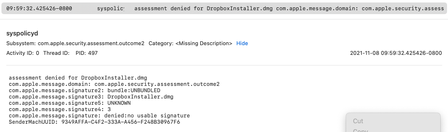
The installer just doesn't start. Digging on console I found this:
Apparently is a problem with its signature.
Any help?


janniy
4 years agoNew member | Level 2
I followed this thread and I am still unable to open dropbox.
Context:
I recently updated macOS to Monterey 12.2, and I am unable to open dropbox. I tried to reinstall but all suggestions (added the dropbox to have full Disk access with the dropbox version I currently have, tried to reinstall dropbox with the offline installer via the link you provided and the regular installer but does not open the dmg files/ does not start installation).
I would appreciate any help here.

Walter Dropbox Community Moderator
4 years agoDropbox Community ModeratorHey janniy, sorry to hear you're having issues with this.
At this point, could you try an advanced reinstall and let me know how it goes?
At this point, could you try an advanced reinstall and let me know how it goes?
- janniy4 years agoNew member | Level 2
Hi Walter,
Thanks for your suggestion. I tried to advance reinstall. After following the steps, I got to the point I cannot reinstall Dropbox because for some reason the dmg files do not open (I tried several versions, including the newest offline installer).
Do you have any other suggestions?
Thanks for any help,
Janni

About Apps and Installations
Have a question about a Dropbox app or installation? Reach out to the Dropbox Community and get solutions, help, and advice from members.
The Dropbox Community team is active from Monday to Friday. We try to respond to you as soon as we can, usually within 2 hours.
If you need more help you can view your support options (expected response time for an email or ticket is 24 hours), or contact us on X, Facebook or Instagram.
For more info on available support options for your Dropbox plan, see this article.
If you found the answer to your question in this Community thread, please 'like' the post to say thanks and to let us know it was useful!


