Your workflow is unique 👨💻 - tell us how you use Dropbox here.
Forum Discussion

ab303
2 years agoHelpful | Level 5
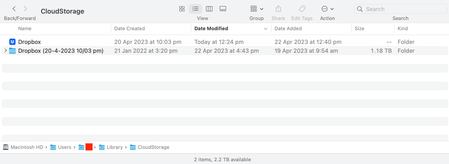
CloudStorage Folder on Mac - Duplicate Dropbox Folders
I have recently updated Dropbox to the latest version (v172.4.7555) whereby the location of my Dropbox folder has moved to the 'CloudStorage' folder within Library on Mac OS (Ventura 13.3.1).
F...

Nancy Dropbox Community Moderator
2 years agoDropbox Community ModeratorHi Tim! Hope it’s OK to jump in.
If you open the old Dropbox folder that you see, what’s located inside it? Does it have the exact same files as the other folder?

TimReid
2 years agoHelpful | Level 5
Hey Nancy, for sure, that's fine.
So having a quick comparison, the older one seems to have a lot less in the root folder, even though it takes up more space— but I think that's to do with me having to do 'online only' to free up some space. The newer one also resembles the Dropbox folder on my other computer, so I'm 99% certain that's the right one, I just don't know if things got stuck in the transfer.
I should also mention that I found this problem using Omni Disk Sweeper, which told me I'm using 918GB out of a possible 500GB... so that's interesting 😕
I think I'm going to back up the old folder and then delete as a user above mentioned, but let me know if you have any advice.
Thanks!
- Hannah2 years ago
Before you delete anything, Tim, can you make sure that you have all your files saved in your account online?
If you could also send us a screenshot of both the old and the new Dropbox folder, to compare, it would be really helpful.
- TimReid2 years agoHelpful | Level 5
Hey Hannah,
I've done some more clicking around and noticed that some files hadn't synced to other devices or online - I'm very glad I checked before deleting. I have numerous shortcuts for projects added to my sidebar, so my theory is this: When updating to the new version of Dropbox, these shortcuts remained, keeping a duplicate version of the folders/files that is saved locally. This theory is backed up by right clicking on any folder/file and noticing there's no Dropbox functionality (sync, copy link, etc).
So my plan is to now merge the two folders and see what happens. Will let you know!
P.S. my clients wouldn't appreciate me sharing project names on a forum, so I'll skip the screenshots for now
- Megan2 years ago
Hey Tim, you might be onto something!
In any case, take your time, and update us when you can. Thanks!


About Apps and Installations
Have a question about a Dropbox app or installation? Reach out to the Dropbox Community and get solutions, help, and advice from members.
The Dropbox Community team is active from Monday to Friday. We try to respond to you as soon as we can, usually within 2 hours.
If you need more help you can view your support options (expected response time for an email or ticket is 24 hours), or contact us on X, Facebook or Instagram.
For more info on available support options for your Dropbox plan, see this article.
If you found the answer to your question in this Community thread, please 'like' the post to say thanks and to let us know it was useful!


