Your workflow is unique 👨💻 - tell us how you use Dropbox here.
Forum Discussion

athenabeta
2 years agoExplorer | Level 3
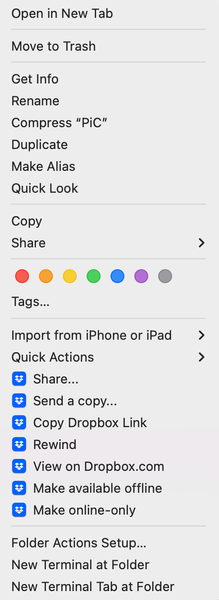
Context Menu Not Working after recent update.
I posted the said menu in case it wasn't call "context menu". Anyway, after the big update for macOS, these dropbox menus not working for me. Nothing happened when I clicked on share, copy dro...

Megan Dropbox Community Moderator
2 years agoDropbox Community ModeratorHi athenabeta , thanks for posting here, let's have a look!
In regards to your context menu not working, can you clarify the app's current syncing status, please?
Also, have you tried quitting the app, and then signing in again?
Keep me posted, and we'll take it from there!
 athenabeta2 years agoExplorer | Level 3
Hello Megan,
I've check the status and it is "√ Your files are up to date."
I tried installing dropbox app twice as well as sign in and out once, which doesn't seem to solve the problem.
- Megan2 years ago
Hi athenabeta , thanks for your speedy reply!
I would like for you to locate your Dropbox icon on your menu bar, next to your WiFi and hover your mouse over it. That should give you the app's version. Can you check, and let me know?
Also, it might sound trivial, but have you tried re-starting your device at all?
- athenabeta2 years agoExplorer | Level 3
Hello Megan ,
I've check the version like you asked and it say "Dropbox 170.4.5895 Up to date". I also have restart my mac several time since update/reinstallation.
About Apps and Installations
Have a question about a Dropbox app or installation? Reach out to the Dropbox Community and get solutions, help, and advice from members.
The Dropbox Community team is active from Monday to Friday. We try to respond to you as soon as we can, usually within 2 hours.
If you need more help you can view your support options (expected response time for an email or ticket is 24 hours), or contact us on X, Facebook or Instagram.
For more info on available support options for your Dropbox plan, see this article.
If you found the answer to your question in this Community thread, please 'like' the post to say thanks and to let us know it was useful!


