Your workflow is unique 👨💻 - tell us how you use Dropbox here.
Forum Discussion

athenabeta
2 years agoExplorer | Level 3
Context Menu Not Working after recent update.
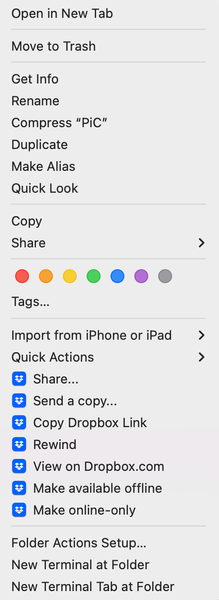
I posted the said menu in case it wasn't call "context menu". Anyway, after the big update for macOS, these dropbox menus not working for me. Nothing happened when I clicked on share, copy dro...

athenabeta
2 years agoExplorer | Level 3
Hi Walter ,
I have look into the discussion and could say that I have no backup and syncing or antivirus 3rd party apps running. I only have Dropbox currently.
I also tried relaunching Finder as well but doesn't solve the problem I'm having.

Hannah Dropbox Community Moderator
2 years agoDropbox Community ModeratorHey athenabeta , would you mind just downloading and running the installer for the most recent version of the Dropbox app to update it, and see if that helps?
- athenabeta2 years agoExplorer | Level 3
Hi Hannah
I download and install the most recent version of the app from the link but it doesn't seem to help. The dropbox context menus, aside from setting offline and only, don't work.
- Emmet2 years ago
Community Manager
Hi there,
We’d like to check what’s going on here, would you mind if we reached out to the email associated with your community profile to look into this further?
Thank you!
- athenabeta2 years agoExplorer | Level 3
Hello Emet, sorry it took so long to reply. I do not mind discussing more thru email.
- Megan2 years ago
Hi athenabeta , can I send you an email, in order for us to have a closer look into this?
- athenabeta1 year agoExplorer | Level 3
Sorry to bring it up again from long absent. I am still having the same problem after several updates later. Only 'Make available offline' is working.
- Walter1 year ago
Hey athenabeta - sorry to hear about this.
Could you please clarify your device's OS and the version and status of the Dropbox app as shown in your menu bar?
Have you tried reinstalling the app since you first noticed this by the way?
- athenabeta1 year agoExplorer | Level 3
Hi Walter,
I've tried reinstalling the app several time since. Right now the app version is 195.4.4995. My OS is macOS Monterey 12.7.4
- Walter1 year ago
Thanks for the additional information there athenabeta
Do you happen to be running any 3rd party apps that might be causing issues like antivirus programs or apps that monitor, sync or backup your files?
Also, can you clarify what happens when you click on the other options apart from the 'make available offline' one? Are you getting any error or is it just not responding?
- athenabeta1 year agoExplorer | Level 3
I'm not sure about 3rd party apps for sync/backup or monitoriing but I am sure I don't have antivirus program.
When I click on other options the menu closes but nothing else happened. No error popup or anything, just silence.
 BenDBX1 year ago
Hi @athenabeta
I've informed our Engineering team of your issue and they are investigating. I'll let you know when I have an update.
Thanks,
Ben


About Apps and Installations
Have a question about a Dropbox app or installation? Reach out to the Dropbox Community and get solutions, help, and advice from members.
The Dropbox Community team is active from Monday to Friday. We try to respond to you as soon as we can, usually within 2 hours.
If you need more help you can view your support options (expected response time for an email or ticket is 24 hours), or contact us on X, Facebook or Instagram.
For more info on available support options for your Dropbox plan, see this article.
If you found the answer to your question in this Community thread, please 'like' the post to say thanks and to let us know it was useful!


