Your workflow is unique 👨💻 - tell us how you use Dropbox here.
Forum Discussion

Tim_J
11 months agoNew member | Level 2
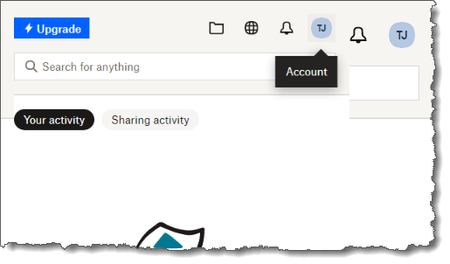
Desktop app on Windows doesn't display correctly. The pop up window looks duplicated.
In the app window when I try to select an icon at the top another duplicate but smaller window appears. The same issue occurs in other places (see 2nd screenshot). I've tried uninstalling and re-inst...
 11 months ago
Hi Megan,
I tried deselecting Hardware Acceleration (GPU) as suggested in the older case and that worked. I didn't realise there was a Ctrl+click option to pull up a extra set of options?
I'm so pleased after putting up with the irritation for a long while.
Tim_J
11 months agoNew member | Level 2
Hi Megan,
I tried deselecting Hardware Acceleration (GPU) as suggested in the older case and that worked. I didn't realise there was a Ctrl+click option to pull up a extra set of options?
I'm so pleased after putting up with the irritation for a long while.


About Apps and Installations
Have a question about a Dropbox app or installation? Reach out to the Dropbox Community and get solutions, help, and advice from members.
The Dropbox Community team is active from Monday to Friday. We try to respond to you as soon as we can, usually within 2 hours.
If you need more help you can view your support options (expected response time for an email or ticket is 24 hours), or contact us on X, Facebook or Instagram.
For more info on available support options for your Dropbox plan, see this article.
If you found the answer to your question in this Community thread, please 'like' the post to say thanks and to let us know it was useful!


