Our Community is in read-only mode until April 8th, learn more here. You can still search existing threads or get help via Dropbox Support, the Dropbox Help Center, or Learn.
Forum Discussion

MikeLV
4 years agoExplorer | Level 4
Dropbox app won't start on M1 Mac running Big Sur
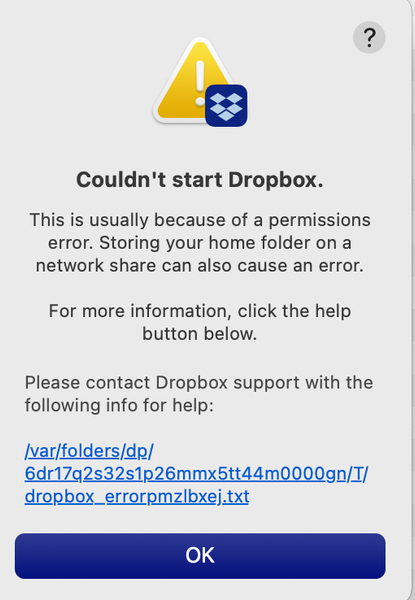
I just got a new MacBook Air M1 running BigSur. Dropbox does show up in the Finder sidebar and it appears the Dropbox files and folders on my Mac have synced with Dropbox.com. However the dropbox i...
- 4 years agoThanks for providing the full error-log MikeLV.
Could you please try an advanced reinstall with admin privileges and let me know how it goes?
While at it, please make sure that there's no antivirus or firewall that might be causing issues.
Keel me posted with your progress!

Walter Dropbox Community Moderator
4 years agoDropbox Community ModeratorHey there MikeLV & victoriabaum, thanks for posting on our Community and sorry to hear about this.
Could both of you please click on the hypertext from your error message and send us the full error log?
This will help us assist further!
Could both of you please click on the hypertext from your error message and send us the full error log?
This will help us assist further!

MikeLV
4 years agoExplorer | Level 4
Thank you for getting back to me. The error message I receive is at the top of this stream. FYI I have deleted and re-downloaded the installer numerous times and always get the same result. Also shut down and restarted the computer after deleting the installed app and the installer. None of that worked. I am running Mac OS BigSur version 11.4.
You asked for the full error log. It is very long. Here it is:
bn.BUILD_KEY: Dropbox
bn.VERSION: 125.4.3474
bn.constants.WINDOWS_SHELL_EXT_VERSION: 48
bn.is_frozen: True
machine_id: 3c855c8f-1be4-5167-9ada-50e978519c94
pid: 12896
ppid: 1
uid: 501
user_info: pwd.struct_passwd(pw_name='Mike', pw_passwd='********', pw_uid=501, pw_gid=20, pw_gecos='Michael Vaughn', pw_dir='/Users/Mike_1', pw_shell='/bin/bash')
effective_user_info: pwd.struct_passwd(pw_name='Mike', pw_passwd='********', pw_uid=501, pw_gid=20, pw_gecos='Michael Vaughn', pw_dir='/Users/Mike_1', pw_shell='/bin/bash')
euid: 501
gid: 20
egid: 20
group_info: grp.struct_group(gr_name='staff', gr_passwd='*', gr_gid=20, gr_mem=['root', 'mike', 'Patty', 'Mike', '_nsurlstoraged', '_serialnumberd'])
effective_group_info: grp.struct_group(gr_name='staff', gr_passwd='*', gr_gid=20, gr_mem=['root', 'mike', 'Patty', 'Mike', '_nsurlstoraged', '_serialnumberd'])
DYLD_LIBRARY_PATH: None
cwd: '/'
real_path='/'
mode=0o40755 uid=0 gid=0
parent mode=0o40755 uid=0 gid=0
HOME: '/Users/Mike_1'
appdata: '/Users/Mike_1/.dropbox/instance1'
real_path='/Users/Mike_1/.dropbox/instance1'
mode=0o40700 uid=501 gid=20
parent mode=0o40700 uid=501 gid=20
dropbox_path: '/Users/Mike_1/Dropbox'
real_path='/Users/Mike_1/Dropbox'
mode=0o40700 uid=501 gid=20
parent mode=0o40755 uid=501 gid=20
sys_executable: '/Applications/Dropbox.app/Contents/MacOS/Dropbox'
real_path='/Applications/Dropbox.app/Contents/MacOS/Dropbox'
mode=0o100755 uid=501 gid=20
parent mode=0o40755 uid=501 gid=20
trace.__file__: '/Applications/Dropbox.app/Contents/Resources/python-packages.zip/dropbox/client/ui/common/boot_error.pyc'
real_path='/Applications/Dropbox.app/Contents/Resources/python-packages.zip/dropbox/client/ui/common/boot_error.pyc'
not found
parent not found
tempdir: '/var/folders/dp/6dr17q2s32s1p26mmx5tt44m0000gn/T'
real_path='/private/var/folders/dp/6dr17q2s32s1p26mmx5tt44m0000gn/T'
mode=0o40700 uid=501 gid=20
parent mode=0o40755 uid=501 gid=20
Traceback (most recent call last):
File "dropbox/client/main.pyc", line 819, in wrapper
File "dropbox/client/main.pyc", line 6472, in finish_dropbox_boot
File "dropbox/client/message_queue.pyc", line 307, in _wrapped
File "dropbox/client/main.pyc", line 6005, in _init_components_for_account
File "dropbox/client/main.pyc", line 5932, in create_sync_engine
File "dropbox/sync_engine_boundary/factory.pyc", line 225, in make_sync_engine
File "dropbox/sync_engine/nucleus/classic_client/sync_engine.pyc", line 275, in __init__
File "dropbox/sync_engine/nucleus/classic_client/modern_client/modern_client.pyc", line 219, in __init__
File "dropbox/sync_engine/nucleus/classic_client/modern_client/base.pyc", line 149, in __init__
File "dropbox/sync_engine/nucleus/classic_client/thin_adapter/in_proc.pyc", line 223, in __init__
File "dropbox/sync_engine/nucleus/classic_client/thin_adapter/in_proc.pyc", line 597, in _init_new_engine_locked
File "dropbox/sync_engine/nucleus/thin_client/client.pyc", line 182, in __init__
File "extensions/nucleus/nucleus_python.pyx", line 76, in nucleus_python.NucleusSyncEngine.__cinit__
nucleus_python.SyncEngineError: "Initializing engine |>> Initializing filesystem |>> Attempting to register icons |>> Opening dst |>> open syscall |>> Permission denied"
- Walter4 years agoThanks for providing the full error-log MikeLV.
Could you please try an advanced reinstall with admin privileges and let me know how it goes?
While at it, please make sure that there's no antivirus or firewall that might be causing issues.
Keel me posted with your progress!- MikeLV4 years agoExplorer | Level 4
It worked! I must tell you, the Terminal thing is not easy to figure out but after a couple tries, I got it.
 Tim T.4 years agoExplorer | Level 3
The advanced reinstall works (as does re-initializing the drive, reinstalling the macOS, and then restoring files/applications/etc from a Time Machine backup previous to the appearance of the problem). However, the Cannot Start Dropbox error keeps coming back—in some cases after any restart, or after sleep (note: my SSD is set to never sleep), or—as in this last reinstall of Dropbox—upon the first attempt to start Dropbox at the end of the install process. I have made sure the Dropbox app is allowed incoming traffic through the firewall, I have excluded the Dropbox app from being scanned by Bitdefender anti-virus.
Dropbox has become unusable. This is a REAL problem, as I use it to coordinate with colleagues (other consultants) for work. If Dropbox doesn't fix this new (only began in the last two weeks - no changes in my software/OS during that time) problem soon, I will have to abandon it for some other cloud service. I like Dropbox and have never had problems like this before.
About Apps and Installations
Have a question about a Dropbox app or installation? Reach out to the Dropbox Community and get solutions, help, and advice from members.
The Dropbox Community team is active from Monday to Friday. We try to respond to you as soon as we can, usually within 2 hours.
If you need more help you can view your support options (expected response time for an email or ticket is 24 hours), or contact us on X, Facebook or Instagram.
For more info on available support options for your Dropbox plan, see this article.
If you found the answer to your question in this Community thread, please 'like' the post to say thanks and to let us know it was useful!


