Our Community is in read-only mode until April 8th, learn more here. You can still search existing threads or get help via Dropbox Support, the Dropbox Help Center, or Learn.
Forum Discussion

GregHutchings
4 years agoHelpful | Level 5
Dropbox MacOS extension supporting > Monterey?
Hi. I've just upgraded my Mac to MacOS Monterey and received the warning below. Apple recommends that I contact Dropbox about this, and though I am a paying customer, the only support mechanism tha...
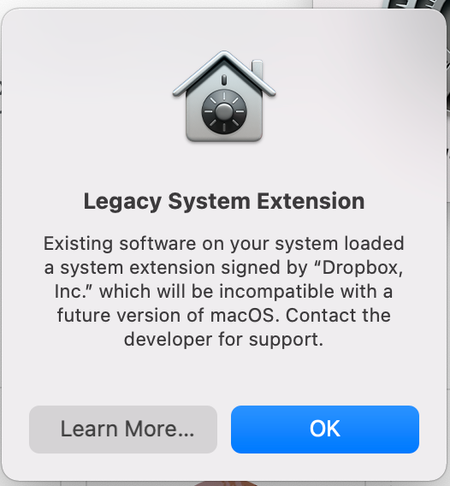
- 4 years agoHi GregHutchings, thanks for reaching out.
First of all, please ensure that you're signed into your paid account in order to see all available support options.
This message is about how a component will behave on a future release of a macOS. There's no change in the way Dropbox will work on your computer (and your data will continue to be accessible, too).
We're hard at work on full support for online-only files on future macOS versions. In the meantime, if you have any issues opening online-only content, you can still do so by double clicking on your files in Finder.
Let me know in case you need something else!


moerangi
3 years agoExplorer | Level 4
I am having this EXACT issue, and have already been on with Dropbox Support for two hours! The first hour, they kept saying it was the other apps (that I couldn't open the DB files on) that had the issue. Then they said 'oh wait, yes you are right'. The second hour was 'It's Apple's fault' with absolutely no way to help me. They're still happy to charge me $150 per month though!

pelmered
3 years agoHelpful | Level 6
This and the weird limitation of the backup feature(you can't select any folders you want) made me cancel my professional account and I'm now looking for alternatives.
From what I can till Apple announced these changes long time ago which means Dropbox had a lot of time to react, but they did almost nothing. Now they have had some kind of beta software that I don't get even if I have selected early releases for months.
You really need to step up your game Dropbox.
About Apps and Installations
Have a question about a Dropbox app or installation? Reach out to the Dropbox Community and get solutions, help, and advice from members.
The Dropbox Community team is active from Monday to Friday. We try to respond to you as soon as we can, usually within 2 hours.
If you need more help you can view your support options (expected response time for an email or ticket is 24 hours), or contact us on X, Facebook or Instagram.
For more info on available support options for your Dropbox plan, see this article.
If you found the answer to your question in this Community thread, please 'like' the post to say thanks and to let us know it was useful!


