We’re Still Here to Help (Even Over the Holidays!) - find out more here.
Forum Discussion

Kyle Mickan
4 years agoNew member | Level 2
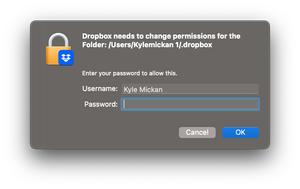
Dropbox Needs to change premissions for Folder which doesn't exist
Every time I open the dropbox app on mac I get this prompt
The problem is the path it should be /User/Kylemickan/.dropbox not /User/Kylemickan 1/.dropbox which no longer exists there is a .d...
 4 years ago
I have solved this myself.
I deleted the .dropbox folder from my user folder. I also deleted the hidden files (Press cmd+shift+. to show) from my dropbox folder after reopening the dropbox app I went through the setup prompts I selected the old dropbox folder and everything works fine now.
Kyle Mickan
4 years agoNew member | Level 2
I have solved this myself.
I deleted the .dropbox folder from my user folder. I also deleted the hidden files (Press cmd+shift+. to show) from my dropbox folder after reopening the dropbox app I went through the setup prompts I selected the old dropbox folder and everything works fine now.
About Apps and Installations
Have a question about a Dropbox app or installation? Reach out to the Dropbox Community and get solutions, help, and advice from members.
The Dropbox Community team is active from Monday to Friday. We try to respond to you as soon as we can, usually within 2 hours.
If you need more help you can view your support options (expected response time for an email or ticket is 24 hours), or contact us on X, Facebook or Instagram.
For more info on available support options for your Dropbox plan, see this article.
If you found the answer to your question in this Community thread, please 'like' the post to say thanks and to let us know it was useful!


