Your workflow is unique 👨💻 - tell us how you use Dropbox here.
Forum Discussion

Jharn
3 years agoHelpful | Level 5
Dropbox preventing GPU to switch display mode
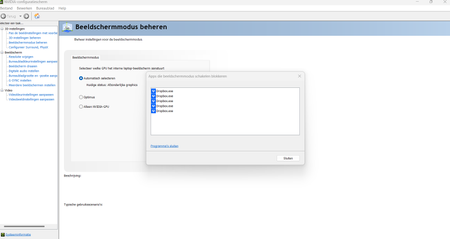
Hello I have a gaming laptop with a discrete RTX 3070 GPU. Nvidia control center manages the switching of the display to the integrated or the discrete GPU, depending on the needs. It should sw...
 2 years ago
Hi Everybody,
We have implemented a hardware acceleration toggle, and we would love if anyone experiencing this could test it out to make sure it solves the problem.
Affected users on Mac can option + click on the tray icon and disable hardware acceleration from the drop down menu.
Affected users on Windows can ctrl + click on the tray icon and disable hardware acceleration from the drop down menu.
Let us know if this works!
Regards,
Ben
Jharn
3 years agoHelpful | Level 5
Hello!
I installed the version that you mentioned, but sadly it has the exact same effect.
On a side note:
The 'early releases switch' was already turned off in my settings and I installed the Dropbox application from the main Dropbox.com site (which installed that 160.3.4611 version. I didn't specifically go for any beta version (maybe this just became the next stable build yesterday or something?).

Megan Dropbox Community Moderator
3 years agoDropbox Community ModeratorHi Jharn, just to clarify, which version do you have installed on the device at the moment?
Also, feel free to have a look into this Help Center article, in regards to high CPU usage, and make sure you've excluded all possible factors.
- Jharn3 years agoHelpful | Level 5
Hi
I tried with both the versions 159.4.5870 (as Walter suggested) and 160.3.4611 (which is installed by clicking 'download app' on the dropbox homepage).
The problem persists in both versions.
I also checked the Help Center page you suggested, but this doesn't really fix anything related to the problem I'm having.
My problem has something to do with Dropbox using the GPU to render some things and not allowing to switch the GPU while running the app.

About Apps and Installations
Have a question about a Dropbox app or installation? Reach out to the Dropbox Community and get solutions, help, and advice from members.
The Dropbox Community team is active from Monday to Friday. We try to respond to you as soon as we can, usually within 2 hours.
If you need more help you can view your support options (expected response time for an email or ticket is 24 hours), or contact us on X, Facebook or Instagram.
For more info on available support options for your Dropbox plan, see this article.
If you found the answer to your question in this Community thread, please 'like' the post to say thanks and to let us know it was useful!


