Your workflow is unique 👨💻 - tell us how you use Dropbox here.
Forum Discussion

Jharn
3 years agoHelpful | Level 5
Dropbox preventing GPU to switch display mode
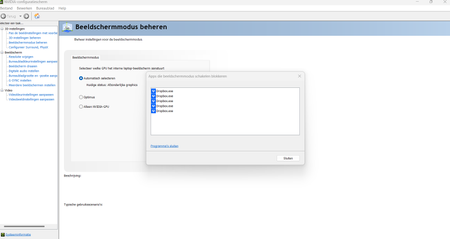
Hello I have a gaming laptop with a discrete RTX 3070 GPU. Nvidia control center manages the switching of the display to the integrated or the discrete GPU, depending on the needs. It should sw...
 2 years ago
Hi Everybody,
We have implemented a hardware acceleration toggle, and we would love if anyone experiencing this could test it out to make sure it solves the problem.
Affected users on Mac can option + click on the tray icon and disable hardware acceleration from the drop down menu.
Affected users on Windows can ctrl + click on the tray icon and disable hardware acceleration from the drop down menu.
Let us know if this works!
Regards,
Ben

Walter Dropbox Community Moderator
3 years agoDropbox Community ModeratorHey Jharn, happy Monday and sorry for the late reply.
If you're still having issues with this, would it be OK if we reached out via email to investigate further?
Jharn
3 years agoHelpful | Level 5
Hello
Yes, certainly! Thank you.
 AB20213 years agoHelpful | Level 5
I have the same issue.
I get the error "Application blocking display mode change", with the app being dropbox.exe
Can you share a fix ?
- Jharn3 years agoHelpful | Level 5
I ultimately just turned off the integrated graphics all together and decided to just run everything on the discrete Nvidia GPU all the time to prevent it having to switch. Not ideal for battery life, but at least I don't have the problem anymore 🙂
 allanriveroll3 years agoNew member | Level 2
Hi! The same is happening to me with Dropbox and Google Drive.
The instant fix, as you say, is just to use the NVIDIA GPU, but it's no ideal at all!
Hope Dropbox works on a solution for this problem.
- AB20213 years agoHelpful | Level 5
Here you go:
Error message :
Version:
As you can see with the other comments, this is not a unique issue to me, its the exact same error as the OP.
Can you please check my dropbox is locking the GPU and preventing it changing ?
Thank you
- Nancy3 years ago
Hi AB2021, and thanks for the screenshots!
It looks like you’re currently running the beta app version of the Dropbox app (162.3.5368), which may cause various issues. Can you please switch to the stable one, and let me know if you see any difference?
allanriveroll, can you also check whether your desktop app is running the beta app version and switch to the stable one, if necessary?
- AB20213 years agoHelpful | Level 5
Why does your dropbox.com website share beta versions ?
I downloaded the client direct from dropbox.com and you're telling me its the beta one?
Regardless, both versions have already been tested as mentioned here:
and the issue remains
- Hannah3 years ago
Hey AB2021, you probably have the "early releases" option enabled in your account settings.
This would download the beta version of the app to your computer. You can turn this setting off from this page.
Once that's off, can you please install the latest version of the app?
There's a new stable version out, which might do the trick.
 kokuryuha3 years agoHelpful | Level 6
Add me to the list with the same problem.
Early releases is not turned on, and Dropbox was just downloaded from the site. 161.4.4923.
 Paul Hx3 years agoNew member | Level 2
I'm having the same problem. Dropbox v162.4.5419 (settings are to opt out of using beta releases).
- Jharn3 years agoHelpful | Level 5
Hey, I'm the OP. I didn't really get around to getting an actual fix, but I just decided to turn of the iGPU entirely (if you have a MUX switch), so my laptop just runs entirely on the discrete GPU all the time. It's worse for battery life, but I'm no longer hindered by this and can let Dropbox run in the background without problems 🙂
 Trisk3 years agoExplorer | Level 4
Hey guys! Having the same issue as well. "Early release" is turned off, running v163.4.5456.
My solution is to quit the dropbox instead of switching everything to discrete GPU.
Is there any solution for this?
- anonymous3 years agoMine has been messed up black screen whenever its about to load the desktop, but its ubuntu that it wont load linux 5.15.46-47 ubuntu with linux i think the grub or sonething took 2gigs of ram for no reason
- nnifinn3 years agoNew member | Level 2
I'm having this issue as well on a new laptop with a discrete GPU.
- Dropbox version: 163.4.5456 (experimental versions disabled)
- Operating system: Windows 11 (Version 10.0.22621 Build 22621)
- CPU: i9-12900H
- GPU: Nvidia RTX 3070ti
- Nvidia driver version: 527.56
Please feel free to reach out to me via email and let me know what I can do to help.
Edit: I ignored the "failed to change display mode" message and loaded into my game, and I found that the game used the Nvidia GPU instead of the iGPU. It seems that the error is a non-issue.
- Ash_mz213 years agoExplorer | Level 4
Same problem, both GoogleDriveFS.exe and Dropbox.exe are preventing display mode change,
Windows 11
RTX3060 running 528.02
Dropbox v165.4.4286
- Megan3 years ago
Hi Ash_mz21, welcome to our Community!
Have you tried all the troubleshooting steps mentioned throughout this thread? I'm asking, because I would like to know what you've already tried on your end, before we proceed.
Keep me posted, and we'll take it from there!
 Mfor183 years agoNew member | Level 2Does Dropbox.exe use DirectX9? Automatic display switching doesn’t work if any DirectX9 application is running.
 Firsto3 years agoHelpful | Level 5
Same here.
I have to close Dropbox before launching the game to switch the video adapter correctly, which is not very convenient.


About Apps and Installations
Have a question about a Dropbox app or installation? Reach out to the Dropbox Community and get solutions, help, and advice from members.
The Dropbox Community team is active from Monday to Friday. We try to respond to you as soon as we can, usually within 2 hours.
If you need more help you can view your support options (expected response time for an email or ticket is 24 hours), or contact us on X, Facebook or Instagram.
For more info on available support options for your Dropbox plan, see this article.
If you found the answer to your question in this Community thread, please 'like' the post to say thanks and to let us know it was useful!


