Need to see if your shared folder is taking up space on your dropbox 👨💻? Find out how to check here.
Forum Discussion

run_the_race
8 months agoHelpful | Level 5
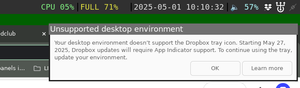
Dropbox says my environment doesn't support tray icon, by it does
In the following image you can see the dropbox system tray icon top right, with the error message below it. I am using the `i3wm` on Ubuntu with `i3status` to show the icons. To me this is a bug in t...

run_the_race
8 months agoHelpful | Level 5
That link just gives one a link to download `install.html` which does nothing when I open it.

Neal Community Manager
8 months agoCommunity ManagerHi run_the_race,
I've investigated this issue personally with our Linux team and they've advised that the problem is that i3 does not support appindicator tray icons: https://github.com/i3/i3/issues/2088.
Unless you're willing to switch from i3 to sway+waybar (not swaybar), which does support appindicator (screenshot attached), you'll be out of luck. Note sway is a more modern "drop-in replacement for the i3 window manager".
About Apps and Installations
Have a question about a Dropbox app or installation? Reach out to the Dropbox Community and get solutions, help, and advice from members.
The Dropbox Community team is active from Monday to Friday. We try to respond to you as soon as we can, usually within 2 hours.
If you need more help you can view your support options (expected response time for an email or ticket is 24 hours), or contact us on X, Facebook or Instagram.
For more info on available support options for your Dropbox plan, see this article.
If you found the answer to your question in this Community thread, please 'like' the post to say thanks and to let us know it was useful!


