Need to see if your shared folder is taking up space on your dropbox 👨💻? Find out how to check here.
Forum Discussion

run_the_race
8 months agoHelpful | Level 5
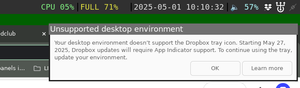
Dropbox says my environment doesn't support tray icon, by it does
In the following image you can see the dropbox system tray icon top right, with the error message below it. I am using the `i3wm` on Ubuntu with `i3status` to show the icons. To me this is a bug in t...

Andsmi
7 months agoHelpful | Level 5
The message popped up for me this morning too, and the Dropbox tray icon no longer shows, even though my environment is compatible:
Distro: Debian 12
Destktop Environment: Gnome 43.9
Windowing System: Windows X11
Window Manager: mutter (the default, when the above options are chosen on install)
$ echo $XDG_SESSION_TYPE x11

$ sudo apt install libappindicator3-1
Reading package lists... Done
Building dependency tree... Done
Reading state information... Done
Note, selecting 'libayatana-appindicator3-1' instead of 'libappindicator3-1'
libayatana-appindicator3-1 is already the newest version (0.5.92-1).
libayatana-appindicator3-1 set to manually installed.
0 upgraded, 0 newly installed, 0 to remove and 0 not upgraded.

# dpkg -l | grep libgtk-3
ii  libgtk-3-0:amd64                               3.24.38-2~deb12u3                   amd64        GTK graphical user interface library
ii  libgtk-3-bin                                   3.24.38-2~deb12u3                   amd64        programs for the GTK graphical user interface library
ii  libgtk-3-common                                3.24.38-2~deb12u3                   all          common files for the GTK graphical user interface library
# dpkg -l | grep libgtk-4
ii  libgtk-4-1:amd64                               4.8.3+ds-2+deb12u1                  amd64        GTK graphical user interface library
ii  libgtk-4-bin                                   4.8.3+ds-2+deb12u1                  amd64        programs for the GTK graphical user interface library
ii  libgtk-4-common                                4.8.3+ds-2+deb12u1                  all          common files for the GTK graphical user interface library
# dpkg -l | grep libglib2.0
ii  libglib2.0-0:amd64                             2.74.6-2+deb12u6                    amd64        GLib library of C routines
ii  libglib2.0-0:i386                              2.74.6-2+deb12u6                    i386         GLib library of C routines
ii  libglib2.0-bin                                 2.74.6-2+deb12u6                    amd64        Programs for the GLib library
ii  libglib2.0-data                                2.74.6-2+deb12u6                    all          Common files for GLib library
AppIndicator:
Name: AppIndicator and KStatusNotifierItem Support
Description: Adds AppIndicator, KStatusNotifierItem and legacy Tray icons support to the Shell
Path: /home/myuser/.local/share/gnome-shell/extensions/appindicatorsupport@[removed].gmail.com
URL: https://github.com/ubuntu/gnome-shell-extension-appindicator
Version: 53
State: ENABLED
I've also raised the issue with AppIndicator on github too (issue #583) to help people who also encounter it.
It seems that AppIndicator support is "not properly detected" in my case, as you said. Can you help?

Neal Community Manager
7 months agoCommunity ManagerHi Andsmi,
I've checked with the team and they said that Dropbox uses DBus to find the app indicator services, so you'll have to make sure that the org.kde.StatusNotifierWatcher service is running. You can do that by running the following command in your terminal:
dbus-send --session \ --type=method_call \ --print-reply \ --dest=org.freedesktop.DBus \ /org/freedesktop/DBus \ org.freedesktop.DBus.ListNames
You should get a list of service names returned, and you should find org.kde.StatusNotifierWatcher in that list.Assuming you see that, you can then query the status of the service using the same DBus message that the Dropbox app uses with the following command:
dbus-send --session \ --type=method_call \ --print-reply \ --dest=org.kde.StatusNotifierWatcher \ /StatusNotifierWatcher \ org.freedesktop.DBus.Properties.Get \ string:org.kde.StatusNotifierWatcher \ string:IsStatusNotifierHostRegistered
If Gnome is properly using the service you should see something like this:
method return time=1748612867.079169 sender=:1.25 -> destination=:1.239 serial=4372 reply_serial=2 variant boolean true
That boolean true is the important part that tells you the service is running and a host is registered.If the appindicator shell extension is properly registering a host and the DBus service is exposed then you should not see that error message.Gnome is currently on version 48, and the appindicator shell extension is currently at version 60, so updating those items may help resolve the issue.
- Andsmi7 months agoHelpful | Level 5
Thanks for the insight into this. Neal Mc.
This is the output from your commands, that show that the service is indeed running.~$ dbus-send --session --type=method_call --print-reply --dest=org.freedesktop.DBus /org/freedesktop/DBus org.freedesktop.DBus.ListNames | grep StatusNotifierWatcher string "org.kde.StatusNotifierWatcher" ~$ dbus-send --session --type=method_call --print-reply --dest=org.kde.StatusNotifierWatcher /StatusNotifierWatcher org.freedesktop.DBus.Properties.Get string:org.kde.StatusNotifierWatcher string:IsStatusNotifierHostRegistered method return time=1748671496.836229 sender=:1.43 -> destination=:1.5702 serial=221064 reply_serial=2 variant boolean true ~$That said, the Dropbox icon is showing now, so maybe there's a bug in how Dropbox detects it in some instances.
I'll let you know if the message shows again.
Thanks for your help. - Andsmi6 months agoHelpful | Level 5
NealMc
Sadly, the message has appeared again...The tray icon still appears and is functional. This is definitely a bug that needs to be fixed.
These are the results of the commands you posted:
`dbus-send --session --type=method_call --print-reply --dest=org.freedesktop.DBus /org/freedesktop/DBus org.freedesktop.DBus.ListNames`
Output:
```bash
string ":1.74"
string ":1.76"
string "org.gnome.SettingsDaemon.Keyboard"
string ":1.77"
string ":1.78"
string "org.kde.StatusNotifierWatcher"
string "com.rastersoft.ding"
string ":1.79"
string "org.freedesktop.secrets"
string ":1.244"
string ":1.246"
string "org.freedesktop.IBus.Panel.Extension.Gtk3"
```
(see attached file for full output)
`dbus-send --session --type=method_call --print-reply --dest=org.kde.StatusNotifierWatcher /StatusNotifierWatcher org.freedesktop.DBus.Properties.Get string:org.kde.StatusNotifierWatcher string:IsStatusNotifierHostRegistered`
Output:
```bash
method return time=1749709304.710873 sender=:1.43 -> destination=:1.4230 serial=203406 reply_serial=2
variant boolean true
```
I hope you can help!
About Apps and Installations
Have a question about a Dropbox app or installation? Reach out to the Dropbox Community and get solutions, help, and advice from members.
The Dropbox Community team is active from Monday to Friday. We try to respond to you as soon as we can, usually within 2 hours.
If you need more help you can view your support options (expected response time for an email or ticket is 24 hours), or contact us on X, Facebook or Instagram.
For more info on available support options for your Dropbox plan, see this article.
If you found the answer to your question in this Community thread, please 'like' the post to say thanks and to let us know it was useful!


