Your workflow is unique 👨💻 - tell us how you use Dropbox here.
Forum Discussion

Sam Toor
1 year agoHelpful | Level 6
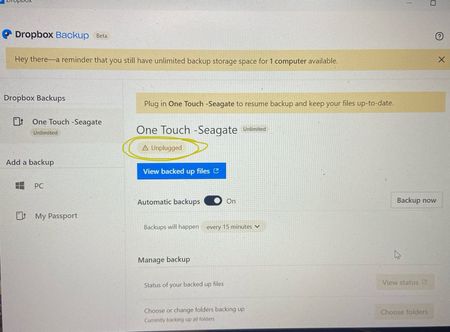
Dropbox Showing Unplugged while my hard drive is still connected
Hi, my dropbox desktop app showing UNPLUGGED while its still connected. I'm using unlimited Auto backup plan but its not syncing anymore. I try to reinstall the dropbox app, connecting disconnect...

Sam Toor
1 year agoHelpful | Level 6
Yes, there is not option to reboot the EXTERNAL DRIVE but I have only used it on my pc only. is there any issue on loging the account on multiple PCs? I didn't used it except on one device only

Jay Dropbox Community Moderator
1 year agoDropbox Community ModeratorIf you were to connect the external drive to another computer, and attempt to back it up, it would be registered as a new backup entirely, and wouldn't just update the existing backup.
- Sam Toor1 year agoHelpful | Level 6
Ok but this is not the issue here. Can you help me solve the issue now?
- Jay1 year ago
As you're still experiencing this issue, I'd recommend contacting the support team directly for them to investigate any account or device-specific details further.
- Sam Toor1 year agoHelpful | Level 6
I can see that one of my family member tried to use it on his pc. So what can be done to restart the backup on my pc? I have removed the device mentioned from the desktop browser and also changed the password but the sync hasn't started yet.
About Apps and Installations
Have a question about a Dropbox app or installation? Reach out to the Dropbox Community and get solutions, help, and advice from members.
The Dropbox Community team is active from Monday to Friday. We try to respond to you as soon as we can, usually within 2 hours.
If you need more help you can view your support options (expected response time for an email or ticket is 24 hours), or contact us on X, Facebook or Instagram.
For more info on available support options for your Dropbox plan, see this article.
If you found the answer to your question in this Community thread, please 'like' the post to say thanks and to let us know it was useful!


