Our Community is in read-only mode until April 8th, learn more here. You can still search existing threads or get help via Dropbox Support, the Dropbox Help Center, or Learn.
Forum Discussion

Sydenham
3 years agoExplorer | Level 3
Dropbox won't open as I'm getting an error
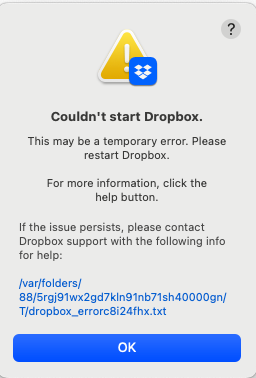
I found that my personal files were ending up in a shared file (with an organisation I am part of). I have moved files elsewhere for now. Then I uninstalled Dropbox when I try to reinstall I keep ge...
 3 years ago
the terminal does not show the password. The cursor on screen will not move, this is the correct behaviour. Just enter your password and press enter and then add the next line by copy/pasting and pressing enter again. Do this until you are finished with all the lines. After having pressed enter after the last line, reinstall the app.

Walter Dropbox Community Moderator
3 years agoDropbox Community ModeratorSince the error persists, could you perform a clean, advanced reinstall and let me know how it goes?

Sydenham
3 years agoExplorer | Level 3
Walter I tried advance install and cannot get paste pasting in first line of instruction. System won't allow me the in P/W
- Jay3 years ago
Hi Sydenham, are you entering the admin password for your machine?
- Sydenham3 years agoExplorer | Level 3
trying to but I cannot do so.
- Sydenham3 years agoExplorer | Level 3
so, this time I was able to copy and paste lines of instructions to the terminal but was not asked for password and once I reinstall, I get same error message as initially
s
- Jay3 years ago
Are you referring to the password error message, or the error log you pasted earlier?

About Apps and Installations
Have a question about a Dropbox app or installation? Reach out to the Dropbox Community and get solutions, help, and advice from members.
The Dropbox Community team is active from Monday to Friday. We try to respond to you as soon as we can, usually within 2 hours.
If you need more help you can view your support options (expected response time for an email or ticket is 24 hours), or contact us on X, Facebook or Instagram.
For more info on available support options for your Dropbox plan, see this article.
If you found the answer to your question in this Community thread, please 'like' the post to say thanks and to let us know it was useful!


