We’re Still Here to Help (Even Over the Holidays!) - find out more here.
Forum Discussion

neuromante
6 years agoHelpful | Level 5
Fedora/Linux tray icon submenu
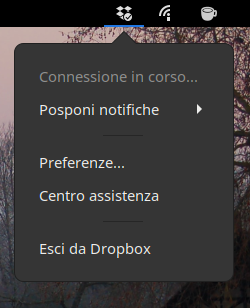
Hi I clearly remember years ago that the tray icons had many options. Now not anymore: Sorry, I know, it's Italian but I guess you can understand it as well.. For ex. it always says "conness...

neuromante
6 years agoHelpful | Level 5
Really weird...it works on ubuntu and opensuse tumbleweed (under kde it's a graphical mess but I have all the submenu options)
Cris70
6 years agoHelpful | Level 5
Hi neuromante what do you mean by "graphical mess"? I am on openSuse Tumbleweed with KDE Plasma and I do not see a "graphical mess", I think.
However, I have non-functional submenus: both the "Recently Changed Files" and the "Snooze Notifications" submenus do not show anything when clicked. Do you see the same?
Thank you in advance
Cris
- Здравко6 years agoLegendary | Level 20
Cris70 wrote:
...However, I have non-functional submenus: both the "Recently Changed Files" and the "Snooze Notifications" submenus do not show anything when clicked. Do you see the same?
...Oooh... I have seen the same for long, very long, time! Unfortunately... 😥😧😦👎 Dropbox doesn't care.

About Apps and Installations
Have a question about a Dropbox app or installation? Reach out to the Dropbox Community and get solutions, help, and advice from members.
The Dropbox Community team is active from Monday to Friday. We try to respond to you as soon as we can, usually within 2 hours.
If you need more help you can view your support options (expected response time for an email or ticket is 24 hours), or contact us on X, Facebook or Instagram.
For more info on available support options for your Dropbox plan, see this article.
If you found the answer to your question in this Community thread, please 'like' the post to say thanks and to let us know it was useful!


