We're making some changes to the Dropbox Community 👩💻 - Find out more here.
Forum Discussion

MariaSki
2 years agoNew member | Level 2
How to expand left sidebar width on the website?
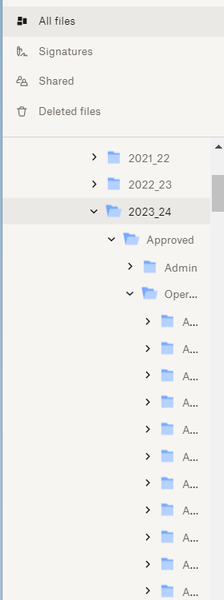
How can I expand the left sidebar width. I have many levels of files and I can not see the names of folders that I want to move files into. As you can see below, all I can see is the first letter of ...

IsItMeYoureLookingFor
1 year agoNew member | Level 2
Same here. We use DB for work and at third level (so company name, department, department main folder), DB starts cutting off folder names. Our names aren't even that long. By the 4th level, where we start putting images/docs by client name, job, or product, I can only see a few letters and it makes keeping stuff organized very difficult. Especially between multiple people in the company. I'm starting to find new folders with the same names as other folders, each in different places, because people couldn't;t find the folder they needed so they made a new one.
You need to make it so we can extend the left folder sidebar, especially for business accounts.
- Walter1 year ago
Dropbox Community Moderator
Hi there IsItMeYoureLookingFor - thanks for joining the discussion here and sharing your use-case too.
If it's not too much trouble, you can post your suggestion in our Share an Idea section following these tips.
Thanks for your feedback!

About Apps and Installations
Have a question about a Dropbox app or installation? Reach out to the Dropbox Community and get solutions, help, and advice from members.
The Dropbox Community team is active from Monday to Friday. We try to respond to you as soon as we can, usually within 2 hours.
If you need more help you can view your support options (expected response time for an email or ticket is 24 hours), or contact us on X, Facebook or Instagram.
For more info on available support options for your Dropbox plan, see this article.
If you found the answer to your question in this Community thread, please 'like' the post to say thanks and to let us know it was useful!


