Your workflow is unique 👨💻 - tell us how you use Dropbox here.
Forum Discussion

donnybrook37a
3 years agoNew member | Level 2
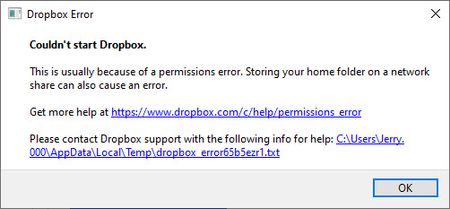
I can't start the desktop app on Windows as I'm getting a permissions error
running windows 10 Prp Version 21H1

donnybrook37a
3 years agoNew member | Level 2
Hi Walter, error message below.
bn.BUILD_KEY: Dropbox
bn.VERSION: 154.4.5363
bn.constants.WINDOWS_SHELL_EXT_VERSION: 52
bn.is_frozen: True
machine_id: 797e4003-6631-4565-adcb-0230b50f6866
pid: 34300
cwd: 'C:\\Program Files (x86)\\Dropbox\\Client'
real_path='C:\\Program Files (x86)\\Dropbox\\Client'
mode=0o40777 uid=0 gid=0
parent mode=0o40777 uid=0 gid=0
HOME: None
appdata: 'C:\\Users\\Jerry\\AppData\\Local\\Dropbox\\instance1'
real_path='C:\\Users\\Jerry\\AppData\\Local\\Dropbox\\instance1'
not found
parent not found
dropbox_path: None
not found
parent not found
sys_executable: 'C:\\Program Files (x86)\\Dropbox\\Client\\Dropbox.exe'
real_path='C:\\Program Files (x86)\\Dropbox\\Client\\Dropbox.exe'
mode=0o100777 uid=0 gid=0
parent mode=0o40777 uid=0 gid=0
trace.__file__: 'C:\\Program Files (x86)\\Dropbox\\Client\\154.4.5363\\python-packages.zip\\dropbox\\client\\ui\\common\\boot_error.pyc'
real_path='C:\\Program Files (x86)\\Dropbox\\Client\\154.4.5363\\python-packages.zip\\dropbox\\client\\ui\\common\\boot_error.pyc'
not found
parent not found
TMP: C:\Users\Jerry.000\AppData\Local\Temp
TEMP: C:\Users\Jerry.000\AppData\Local\Temp
tempdir: 'C:\\Users\\Jerry.000\\AppData\\Local\\Temp'
real_path='C:\\Users\\Jerry.000\\AppData\\Local\\Temp'
mode=0o40777 uid=0 gid=0
parent mode=0o40777 uid=0 gid=0
Traceback (most recent call last):
File "dropbox\client\main.pyc", line 7878, in main_startup
File "dropbox\client\main.pyc", line 2735, in initialize
File "dropbox\client\main.pyc", line 1630, in startup_low
File "dropbox\client\main.pyc", line 1229, in safe_makedirs
File "dropbox\fsutil.pyc", line 655, in safe_makedirs
File "dropbox\overrides.pyc", line 238, in makedirs
File "dropbox\overrides.pyc", line 251, in makedirs
PermissionError: [WinError 5] Access is denied: 'C:\\Users\\Jerry\\AppData\\Local\\Dropbox'

Nancy Dropbox Community Moderator
3 years agoDropbox Community ModeratorHi donnybrook37a, thanks for the error log!
As a test, can you try to temporarily disable any antivirus/firewall you may have on your computer and then, reinstall the desktop app on your device?
Do you still see the same error upon the Dropbox app startup?
About Apps and Installations
Have a question about a Dropbox app or installation? Reach out to the Dropbox Community and get solutions, help, and advice from members.
The Dropbox Community team is active from Monday to Friday. We try to respond to you as soon as we can, usually within 2 hours.
If you need more help you can view your support options (expected response time for an email or ticket is 24 hours), or contact us on X, Facebook or Instagram.
For more info on available support options for your Dropbox plan, see this article.
If you found the answer to your question in this Community thread, please 'like' the post to say thanks and to let us know it was useful!


