Your workflow is unique 👨💻 - tell us how you use Dropbox here.
Forum Discussion

donnybrook37a
3 years agoNew member | Level 2
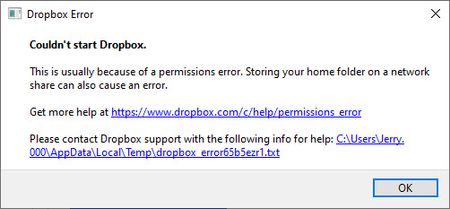
I can't start the desktop app on Windows as I'm getting a permissions error
running windows 10 Prp Version 21H1

beachbum314159
2 years agoNew member | Level 2
I've been using Dropbox installed on my Windows 11 for few months. While using computer, it gave me a popup about permission and the process ended. A reboot now gives me an error "Couldn't start Dropbox" with the full log below.
I didn't change any permissions, didn't install any new software.
What happened? Looks like permission error somehow. Thank you!
bn.BUILD_KEY: Dropbox
bn.VERSION: 193.4.5594
bn.constants.WINDOWS_SHELL_EXT_VERSION: 69
bn.is_frozen: True
machine_id: 091c223e-1dd3-499e-a310-642ffeba31d9
pid: 15876
cwd: 'C:\\WINDOWS\\SysWOW64'
     real_path='C:\\Windows\\SysWOW64'
           	mode=0o40777	uid=0	gid=0
     parent	mode=0o40777	uid=0	gid=0
HOME: None
appdata: 'C:\\Users\\larry\\AppData\\Local\\Dropbox\\instance1'
         real_path='C:\\Users\\larry\\AppData\\Local\\Dropbox\\instance1'
               	mode=0o40777	uid=0	gid=0
         parent	mode=0o40777	uid=0	gid=0
dropbox_path: 'C:\\Users\\larry\\Dropbox'
              real_path='C:\\Users\\larry\\Dropbox'
                    	mode=0o40555	uid=0	gid=0
              parent	mode=0o40777	uid=0	gid=0
sys_executable: 'C:\\Program Files (x86)\\Dropbox\\Client\\Dropbox.exe'
                real_path='C:\\Program Files (x86)\\Dropbox\\Client\\Dropbox.exe'
                      	mode=0o100777	uid=0	gid=0
                parent	mode=0o40777	uid=0	gid=0
trace.__file__: 'C:\\Program Files (x86)\\Dropbox\\Client\\193.4.5594\\python-packages.zip\\dropbox\\client\\ui\\common\\boot_error.pyc'
                real_path='C:\\Program Files (x86)\\Dropbox\\Client\\193.4.5594\\python-packages.zip\\dropbox\\client\\ui\\common\\boot_error.pyc'
                      	not found
                parent	not found
TMP: C:\Users\larry\AppData\Local\Temp
TEMP: C:\Users\larry\AppData\Local\Temp
tempdir: 'C:\\Users\\larry\\AppData\\Local\\Temp'
         real_path='C:\\Users\\larry\\AppData\\Local\\Temp'
               	mode=0o40777	uid=0	gid=0
         parent	mode=0o40777	uid=0	gid=0
Traceback (most recent call last):
  File "desktop/dropbox/fs_api/lifecycle.py", line 235, in client
  File "desktop/dropbox/fs_api/lifecycle.py", line 283, in _create_thin_client
  File "desktop/dropbox/fs_api/fs_api_adapter.py", line 50, in __init__
  File "desktop\extensions\fs_api\fs_api_python.pyx", line 63, in fs_api_python.FsApiServer.__cinit__
fs_api_python.FsApiError: "Initializing fs api |>> Initializing application filesystem |>> Attempting to initialize dbx cache directory |>> NtSetBasicInformation syscall: new handle |>> ACCESS_DENIED |>> Permission denied"

The above exception was the direct cause of the following exception:

Traceback (most recent call last):
  File "desktop/dropbox/client/main.py", line 879, in wrapper
  File "desktop/dropbox/client/main.py", line 6729, in finish_dropbox_boot
  File "desktop/dropbox/client/message_queue.py", line 306, in _wrapped
  File "desktop/dropbox/client/main.py", line 6191, in _init_components_for_account
  File "desktop/dropbox/client/main.py", line 6114, in create_sync_engine
  File "desktop/dropbox/sync_engine_boundary/factory.py", line 225, in make_sync_engine
  File "desktop/dropbox/sync_engine/nucleus/classic_client/sync_engine.py", line 243, in __init__
  File "desktop/dropbox/sync_engine/nucleus/classic_client/modern_client/modern_client.py", line 285, in __init__
  File "desktop/dropbox/sync_engine/nucleus/classic_client/modern_client/base.py", line 242, in __init__
  File "../win32_x86_64_dropbox_virtual_env/python38/Lib/functools.py", line 967, in __get__
  File "desktop/dropbox/fs_api/lifecycle.py", line 259, in client
dropbox.fs_api.lifecycle.FsApiClientCreationException: "Initializing fs api |>> Initializing application filesystem |>> Attempting to initialize dbx cache directory |>> NtSetBasicInformation syscall: new handle |>> ACCESS_DENIED |>> Permission denied"

Hannah Dropbox Community Moderator
2 years agoDropbox Community ModeratorHey beachbum314159, thanks for taking the time to post about your issue and the resolution.
We appreciate your feedback on this and if the issue returns or if you have any questions, let us know.
About Apps and Installations
Have a question about a Dropbox app or installation? Reach out to the Dropbox Community and get solutions, help, and advice from members.
The Dropbox Community team is active from Monday to Friday. We try to respond to you as soon as we can, usually within 2 hours.
If you need more help you can view your support options (expected response time for an email or ticket is 24 hours), or contact us on X, Facebook or Instagram.
For more info on available support options for your Dropbox plan, see this article.
If you found the answer to your question in this Community thread, please 'like' the post to say thanks and to let us know it was useful!


