Your workflow is unique 👨💻 - tell us how you use Dropbox here.
Forum Discussion

Anticia
1 month agoExplorer | Level 3
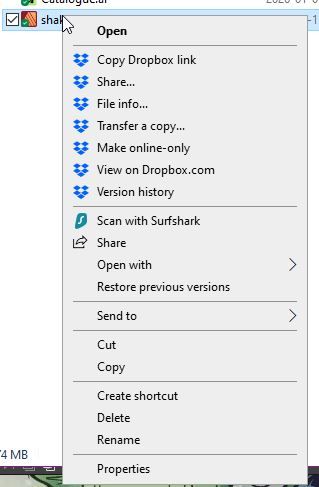
I don't see "sync now" or any other similar options (never had).
Application Affected (Dropbox Desktop, though same on my ipad and Samsung phone as well.) Device (Desktop)Operating System/Browser (if using the web) (Windows 10.) Dropbox App Version (if usin...

Jay Dropbox Community Moderator
1 month agoDropbox Community ModeratorHi Anticia, if you're not on a Dropbox Basic plan with more than 3 devices connected, could you try an advanced reinstall of the app using the steps in this link?
Anticia
1 month agoExplorer | Level 3
I'm sorry but I have no intention of doing such thing.
I had a completely clean install on a wiped SSD 3 days ago.
Old preferences and data could not have possibly carried over on a completely clean OS (neither of these OS reinstalls I mentioned in my OG post were "fix" or "upgrades" - they were all clean state).
So this couldn't be the issue.
And I just finished synchronising my data, no way I want to start over, it's 1.5 TB. :'D
I once foolishly thought having the same dropbox folder intact on a reinstall (on a separate SSD) will just lets dropbox quickly take a stock of it, see that nothing changed (I made sure of that) and be done with it. Instead it treated it like it had to synchrnoise it ALL from scratch.
So eventually I had uninstall Dropbox, delete the Dropbox contents from the SSD (which now had several conflict issues due to assymetrical synchronisation that carried over for the 2 weeks time it failed to synchronise). It was a nightmare.
Now I know the only way to do it quickly is to delete all data and have Dropbox sync in to the drive in small chunks (in about 30-50 gigs at max). It's extremely bothersome to micromanage but it gets the job done in a couple of days (depending how much time I have to keep an eye on it).
I explained all this so you understand why I don't want to do this unless it's absolutely necessary.
Still, no one replied to my question still: is there a way to add (a possibly updated) quick menu to Windows by downloading a registry?

About Apps and Installations
Have a question about a Dropbox app or installation? Reach out to the Dropbox Community and get solutions, help, and advice from members.
The Dropbox Community team is active from Monday to Friday. We try to respond to you as soon as we can, usually within 2 hours.
If you need more help you can view your support options (expected response time for an email or ticket is 24 hours), or contact us on X, Facebook or Instagram.
For more info on available support options for your Dropbox plan, see this article.
If you found the answer to your question in this Community thread, please 'like' the post to say thanks and to let us know it was useful!


