Your workflow is unique 👨💻 - tell us how you use Dropbox here.
Forum Discussion

MarySea
12 hours agoExplorer | Level 3
I have 3 Dropbox folders after opting out of File Provider
Dropbox Mac Studio Mac 15.7.4 Using app but can't find version, I think its the latest I had to sign in and out of the app on 3 March due to a syncing loop, and when I signed back in, I inadverte...

MarySea
11 hours agoExplorer | Level 3
Thanks, I have the Dropbox Essentials plan with 3TB space.
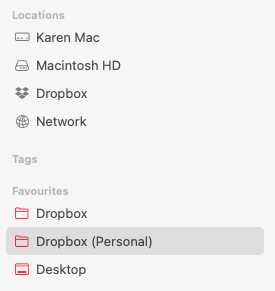
My work folder was with my previous business and is no longer active. My current account is my own personal account and not linked to my old business account – they were separate. I just named my own Dropbox "(Personal)" to differentiate it from my work (Wave) account when that account was still active.
The new Dropbox has synced now, so I can delete the File Provider folder but I am still unsure what to do about the old (Personal) folder in my Users folder. All the file paths from the apps and favourites are pointed to the older 'Dropbox (Personal)' folder, can I merge that with the new Dropbox folder just created or do I have to manually relink about 50 file paths locations?
About Apps and Installations
Have a question about a Dropbox app or installation? Reach out to the Dropbox Community and get solutions, help, and advice from members.
The Dropbox Community team is active from Monday to Friday. We try to respond to you as soon as we can, usually within 2 hours.
If you need more help you can view your support options (expected response time for an email or ticket is 24 hours), or contact us on X, Facebook or Instagram.
For more info on available support options for your Dropbox plan, see this article.
If you found the answer to your question in this Community thread, please 'like' the post to say thanks and to let us know it was useful!


