Your workflow is unique 👨💻 - tell us how you use Dropbox here.
Forum Discussion

MarySea
12 hours agoExplorer | Level 3
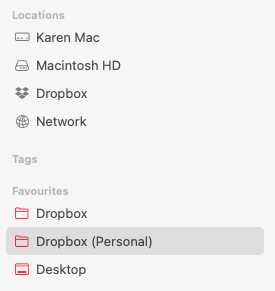
I have 3 Dropbox folders after opting out of File Provider
Dropbox Mac Studio Mac 15.7.4 Using app but can't find version, I think its the latest I had to sign in and out of the app on 3 March due to a syncing loop, and when I signed back in, I inadverte...

MarySea
11 hours agoExplorer | Level 3
I have deleted the File Provider Dropbox in Locations. I have tested the sync by making a new folder in the web app and it only syncs to the new 'Dropbox' folder, not my original 'Dropbox (Personal)' folder. I have also tested my Eagle libraries – and I have to drag the Eagle library folder from the DB(Personal) folder to the new 'Dropbox' folder and then 'Switch the library' in Eagle. It's a bit of a pain, but I guess that is what I will have to do, then remove all my other shortcut 'favourites' and re-add them?
The size of my two Dropbox folder is different too:
You can also see from these two screenshots below, that the Eagle folders have an icon in the old 'Dropbox (Personal) folder but not in the new 'Dropbox' folder. I have moved the DCF 2023-26 folder as an example and relinked it from the Eagle app.

Jay Dropbox Community Moderator
11 hours agoDropbox Community ModeratorCould you check to see if the Dropbox desktop application created a hidden symlink so that any references to the Dropbox (Personal) folder would redirect to the Dropbox folder?
- MarySea10 hours agoExplorer | Level 3
I don't think it does, otherwise my shortcuts in my favourites sidebar would work wouldn't they?
About Apps and Installations
Have a question about a Dropbox app or installation? Reach out to the Dropbox Community and get solutions, help, and advice from members.
The Dropbox Community team is active from Monday to Friday. We try to respond to you as soon as we can, usually within 2 hours.
If you need more help you can view your support options (expected response time for an email or ticket is 24 hours), or contact us on X, Facebook or Instagram.
For more info on available support options for your Dropbox plan, see this article.
If you found the answer to your question in this Community thread, please 'like' the post to say thanks and to let us know it was useful!


