We're making some changes to the Dropbox Community 👩💻 - Find out more here.
Forum Discussion

User134679
5 years agoHelpful | Level 6
I uninstalled the desktop app, but the Dropbox folder is still on my computer. Any help?
Hi!
I have problem with uninstalling dropbox from my computer... One day a donwload it because i need sync documents between my devices but in this time i dont need it. So i go to start panel a...
- 5 years ago
Thanks for that User134679, and for sticking with me here while we look into this!
Let's try manually resetting the default folder location for the Desktop folder. You can exit out of the desktop app setup by quitting the app before taking these steps.
To do this, please navigate to the Desktop folder in File Explorer (not the folder in Dropbox) and then:
- Right click the Desktop folder
- Choose "Properties"
- Go to the "Locations" tab
- Choose to reset to default location.
This will reset the folder location to ensure that it's in the correct location. Once you've done this, can you let me know if you have the same issue when moving the desktop files from Dropbox to the actual Desktop?
If so, please try the previous suggestion once more to reinstall the desktop app and enable the backup.


Larsn
4 years agoHelpful | Level 6
This is what it shows.

Jay Dropbox Community Moderator
4 years agoDropbox Community ModeratorOkay, it looks like only the mobile app is installed on a phone.
What is the file path you're seeing in Explorer? Are you able to move files out of the Dropbox folder directly?
What is the file path you're seeing in Explorer? Are you able to move files out of the Dropbox folder directly?
- Larsn4 years agoHelpful | Level 6
I am not quite sure how I would do that. I can move them to Desktop, but I don't want all my folders and documents there.
As per below, it seems that the files are stored in Dropbox but linked from where they should be, or vice versa.
I really want to get this sorted, I don't trust the way the paths have changed.
Path shown if I start from ‘Local Disk (C:) and then go as per below.
If I go from This PC to Documents, I get this
It is the same documents in both places.
- Larsn4 years agoHelpful | Level 6
This is getting serious now, I just realised that due to this, now all backups that I have in the cloud are no longer working. Probably because I have not set up to back up the Dropbox folder.
I really need to get this sorted as soon as possible.
- Jay4 years agoJust to clarify, if you right click the Documents folder in the Dropbox folder and click Properties, does it show a Location tab?
As you mentioned you uninstalled the Dropbox desktop application, this is why your Dropbox folder isn't syncing any longer. - Larsn4 years agoHelpful | Level 6
That is right, I don't want it to sync, I just want to get rid of the incorrect links that screw up my hard disc and my backups.
How can I get this back to how it was before I even tried to use Dropbox?
- Jay4 years agoIs there a Location tab when you right click the Documents folder and click Properties?
If so, try these steps to see if they help. - Larsn4 years agoHelpful | Level 6
As I previously replied, I tried to do that, but it did not help.
As I also previously explained, this is what I see, the same folders but using two different paths.
How do I get rid of the Dropbox folder without deleting the documents and folders within it?
- Jay4 years agoYou said you tried to do that but 'it did not help'. Do you mean you don't see any option? Are you right clicking a folder icon?
Where exactly are you right clicking? Are you following these steps in this image I found on the web?
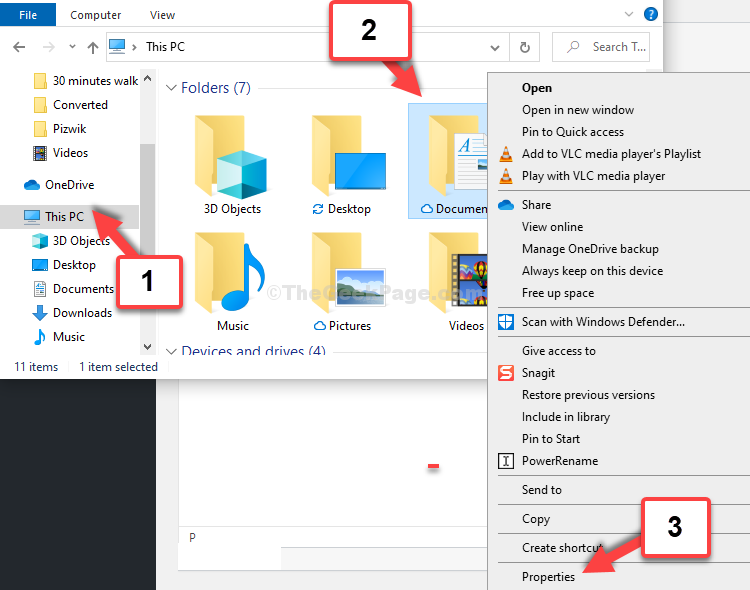
Could you do that for both this Documents folder, and for the one you see inside the Dropbox folder?
- Larsn4 years agoHelpful | Level 6
I have now copied all my folders and files to the Desktop. I then deleted the empty Dropbox folder, and moved the folders and files back to where they were supposed to be.
I still have lots of issues with strange paths to various files and folders. The worst thing is that I lost my external backups due to they were not pointing to the Dropbox folder.
This whole Dropbox thing has been a disaster, I wish I had never gone down that track.
I would like to warn everyone to be very careful and possible avoid installing Dropbox.
About Apps and Installations
Have a question about a Dropbox app or installation? Reach out to the Dropbox Community and get solutions, help, and advice from members.
The Dropbox Community team is active from Monday to Friday. We try to respond to you as soon as we can, usually within 2 hours.
If you need more help you can view your support options (expected response time for an email or ticket is 24 hours), or contact us on X, Facebook or Instagram.
For more info on available support options for your Dropbox plan, see this article.
If you found the answer to your question in this Community thread, please 'like' the post to say thanks and to let us know it was useful!


