Your workflow is unique 👨💻 - tell us how you use Dropbox here.
Forum Discussion

lbenioff25
1 year agoNew member | Level 1
I'm getting an "Installation failed" error on my macOS 15.3.1 computer.
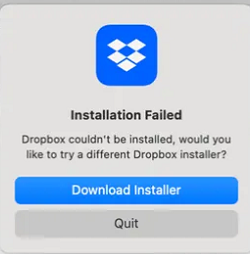
I'm trying to install Dropbox on a MacBookPro18,3 with MAC OS 15.3.1. If I run the Full Desktop I get this message.
If I run the Offline installer once the password is enetered nothing else ha...

SSteel
11 months agoNew member | Level 1
I'm having the same issues! Tried both the online and offline downloads, disabling security/spam software, restarting computer, everything!
- Nancy11 months ago
Dropbox Community Moderator
I’m sorry to hear this, SSteel. Is this the first time you're installing the Dropbox app on your computer or were you in the process of reinstalling it?
Also, to have a visual of the error you’re getting as well, can you send me a screenshot of what you see on your device?
- SSteel11 months agoNew member | Level 1
In the process of re-installing! Here is the error message I got.

About Apps and Installations
Have a question about a Dropbox app or installation? Reach out to the Dropbox Community and get solutions, help, and advice from members.
The Dropbox Community team is active from Monday to Friday. We try to respond to you as soon as we can, usually within 2 hours.
If you need more help you can view your support options (expected response time for an email or ticket is 24 hours), or contact us on X, Facebook or Instagram.
For more info on available support options for your Dropbox plan, see this article.
If you found the answer to your question in this Community thread, please 'like' the post to say thanks and to let us know it was useful!


