Our Community is in read-only mode until April 8th, learn more here. You can still search existing threads or get help via Dropbox Support, the Dropbox Help Center, or Learn.
Forum Discussion

The TechJedi
4 years agoHelpful | Level 5
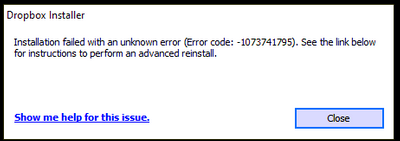
Installation Failed Error Code 1073741795
I keep getting the same error over and over again. I have tried every suggested resolution and nothing has worked. Anyone?
- 3 years ago
Our engineers have put out a new Beta Build: 150.3.4929, which fixes the 'Installation failure: Error code 1073741795'. You can find details about the fix, and how to install it, here.


JenTo
4 years agoHelpful | Level 7
Thank you for jumping in, Walter. Yes, I still need help reinstalling Dropbox desktop on my Win10Pro PC.

Walter Dropbox Community Moderator
4 years agoDropbox Community ModeratorNo worries JenTo - I just sent you an email, so we can have a closer look into this issue.
At your convenience, please have a look at your inbox and we'll take it from there.
At your convenience, please have a look at your inbox and we'll take it from there.
- JenTo4 years agoHelpful | Level 7
I sent you an email follow up to your last reply, but it looks like that ticket was closed and no further reply can be made. Here is what I wrote:
Thanks for your patience.Neither "Dropbox" nor "DropboxUpdate" appear in the registry folders you indicated:HKEY_LOCAL_MACHINE\SOFTWARE\WOW6432Node\
HKEY_LOCAL_MACHINE\SOFTWARE\We removed the various folders from Windows as instructed, then restarted my computer.We then downloaded the full offline installer and installation ended in the same error as I originally reported.I do not know what to do at this point.===- JenTo4 years agoHelpful | Level 7
As a final note, I would just like to add that we have followed the advanced reinstall instructions a number of times, each time removing the related folders and cleaning up the registry and each time the reinstall ends in this same error message. We have tried installing while my computer anti-virus and anti-malware programs were disabled; we have tried while logged in to Dropbox and while not logged in; we have tried after disabling and uninstalling the OneDrive app (which I do not use), all without success.
I've been through a number of other forum posts that contain this error and none of them apparently have been resolved successfully, or at least not publicly. If anyone has had this issue and knows what 3rd party apps or hardware conflict prevents Dropbox from installing or has found a solution, I and other users would be truly grateful if you'd share. TIA
- Nancy4 years ago
Hi JenTo, hope you’re doing well!
I went through your last posts, and l understand that your previous ticket was automatically closed after some time.
In this case, would you like me to open a new one for you perhaps, and have a look into this?
Let me know.

About Apps and Installations
Have a question about a Dropbox app or installation? Reach out to the Dropbox Community and get solutions, help, and advice from members.
The Dropbox Community team is active from Monday to Friday. We try to respond to you as soon as we can, usually within 2 hours.
If you need more help you can view your support options (expected response time for an email or ticket is 24 hours), or contact us on X, Facebook or Instagram.
For more info on available support options for your Dropbox plan, see this article.
If you found the answer to your question in this Community thread, please 'like' the post to say thanks and to let us know it was useful!


