Our Community is in read-only mode until April 8th, learn more here. You can still search existing threads or get help via Dropbox Support, the Dropbox Help Center, or Learn.
Forum Discussion

The TechJedi
4 years agoHelpful | Level 5
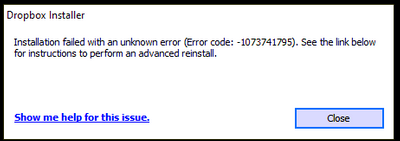
Installation Failed Error Code 1073741795
I keep getting the same error over and over again. I have tried every suggested resolution and nothing has worked. Anyone?
- 3 years ago
Our engineers have put out a new Beta Build: 150.3.4929, which fixes the 'Installation failure: Error code 1073741795'. You can find details about the fix, and how to install it, here.


Nancy Dropbox Community Moderator
4 years agoDropbox Community ModeratorHi JenTo, hope you’re doing well!
I went through your last posts, and l understand that your previous ticket was automatically closed after some time.
In this case, would you like me to open a new one for you perhaps, and have a look into this?
Let me know.

JenTo
4 years agoHelpful | Level 7
Dear Nancy, My previous Ticket was #15786755 and as a free Dropbox user, I appreciate your generous offer. That follow up ticket originally opened by Walter also describes my steps following receiving the in-tray notice from Dropbox that I had 21 days to update the Dropbox app on my computer. Again, Win10Pro, 64-bit, v21H1 (soon v21H2)
However, if there is a solution to this error that goes beyond rotely performing (again and again) an advanced reinstall, or involves removing known conflicting software/hardware, please consider posting the solution publicly. There are a number of users here who would benefit from this information.
Thank you.
- Nancy4 years agoI totally understand what you mean.
The issue is that, if the advanced reinstall didn’t help resolve the issue, I’ll need to see more details on your account, in order to find the best next step.
Since I don’t have any visibility over your Dropbox account here on the forum, I’ve sent you a new email to your Community email address.
Feel free to reply to me, and we’ll take it from there.
Cheers!  MRBUSBY4 years agoHelpful | Level 7
Please post if this issue has been resolved. @Walter seemed to identify an issue for my situation (ARM processor), but before I purchase a different computer with a different processor, I need to know that there is a solution to the problem. The other threads seem to indicate that the error occurs on computers which do not have an ARM processor.
I have been a Dropbox Professional (paid subscription) for 10+ years and would like to continue using the program vs moving to another app.
So far, I have found three threads referencing the error code: 1073741795 and will be posting this comment on each.
- JenTo4 years agoHelpful | Level 7
As the original poster who started this thread on February 8th, I can share that this is not yet resolved and I'm currently being assisted by email. My desktop PC has an Intel i5-6500 processor and I'd been using the Dropbox desktop app without issue for at least 7 years if not longer, but was informed by app system tray notification that I had 21 days to update the app. That's when all this began.
I also looked through the other forum threads including one from another paid user account. As a paid user, I think you have access to direct support and can open a ticket. Good luck. I'm sure you'll get the help you need.
- MRBUSBY4 years agoHelpful | Level 7
Hi JenTo ,
Please accept my apologies if I "highjacked" your original thread. That was not my intent.🤗
My current (soon to be returned) new computer has a ARM processor, and that appears to be part of the issue, although your issue is important to me. I will be purchasing a different computer, with an i7 processor and do not want to encounter this issue without a resolution.
My previous computer was running Win7 (I know, I love legacy software), but the HD crashed in mid February. 😫😭 I was never notified by Dropbox of the need for an "update" and did not have issues using the Desktop version on my Dell Lattitude with the i7 processor.
Hopefully when there is resolution for this error, it will posted here for all to see.
- MRBUSBY4 years agoHelpful | Level 7
Yes, noted with thanks.
I did contact Support. Unfortunately, their response in the chat was to " ensure that SP1 for Win7 was downloaded " and that they could not help further with 3rd party apps or operating systems. The Galaxy Book running Win11 ( a replacement for my Win7 computer which failed) has an ARM processor which does not work with Dropbox Desktop.
Walter helped in this forum by identifying the ARM processor.
I was hoping to see a resolution before I purchase a new computer with an i7 processor and running Win10 Pro or Win 11 Pro.
Unfortunately, Support won't help if there isn't a computer actively having a problem.
I will continue to watch for additional posts/updates and hopefully a resolution here.
About Apps and Installations
Have a question about a Dropbox app or installation? Reach out to the Dropbox Community and get solutions, help, and advice from members.
The Dropbox Community team is active from Monday to Friday. We try to respond to you as soon as we can, usually within 2 hours.
If you need more help you can view your support options (expected response time for an email or ticket is 24 hours), or contact us on X, Facebook or Instagram.
For more info on available support options for your Dropbox plan, see this article.
If you found the answer to your question in this Community thread, please 'like' the post to say thanks and to let us know it was useful!


