Your workflow is unique 👨💻 - tell us how you use Dropbox here.
Forum Discussion

eweberGA
2 years agoExplorer | Level 4
Lost Dropbox Quick Actions on Mac - "Make Available Offline", etc
Hello, I'm on a MacBook Pro which is running the operating system, Sonoma 14.4 Starting a couple of weeks ago, I suddenly lost the ability to access the Dropbox desktop app "Quick Actions". I...
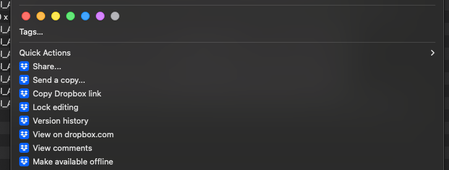
- 2 years ago
Thanks for the information. I'd recommend checking with the support team directly for them to investigate this matter in more detail on their end.


eweberGA
2 years agoExplorer | Level 4
Hello, unfortunately reinstalling didn't help. We tried it a couple of times and no luck.

xample
2 years agoNew member | Level 2
Same, reinstall didnt work. Also signed out and back into my account, this has made the problem worse and now non of my files are syncing on my computer, they are all online only even though ive selected certain folders to sync and i cant seem to get them to be available offline!
- xample2 years agoNew member | Level 2
ive just gone into preferenced, sync and changed the location to my user folder and this has solved the issue. I can now right click again.
- eweberGA2 years agoExplorer | Level 4
My work around for this has been to literally drag the files themselves directly from the Dropbox app to my desktop - this forces the files to "sync" to my computer and from there I can review the files, rename, etc.
Then once I'm finished with the files, I drag the files BACK into the Dropbox and by clicking into the Dropbox icon at the top of the screen...
...I access my preferences dropdown here...
...and access Manage Hard Drive Space. From there, I select the files that are "synced" to my computer and click "Move to Online Only"
- Megan2 years ago
Dropbox Community Moderator
Hey there, xample! Glad to see that you managed to solve this on your end, great news!
Also, amazing job on the screenshots eweberGA!
Can you also try these steps, and let me know how they turn out for you?
- eweberGA2 years agoExplorer | Level 4
Hi Megan,
I tried the steps listed for Extensions, but I didn't have a "Dropbox Finder Integration" option available - when I found the Extensions section, I only saw the following:
I attempted unchecking each box then refreshing the Finder but the Dropbox App options still haven't appeared.

About Apps and Installations
Have a question about a Dropbox app or installation? Reach out to the Dropbox Community and get solutions, help, and advice from members.
The Dropbox Community team is active from Monday to Friday. We try to respond to you as soon as we can, usually within 2 hours.
If you need more help you can view your support options (expected response time for an email or ticket is 24 hours), or contact us on X, Facebook or Instagram.
For more info on available support options for your Dropbox plan, see this article.
If you found the answer to your question in this Community thread, please 'like' the post to say thanks and to let us know it was useful!


