Your workflow is unique 👨💻 - tell us how you use Dropbox here.
Forum Discussion

PaulSon
2 years agoHelpful | Level 6
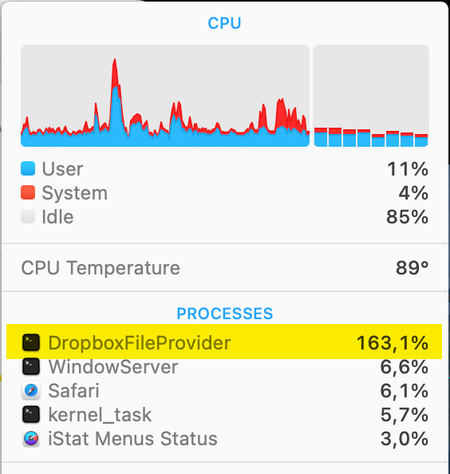
MacOS Sonoma 14.1 constant high CPU by process DropboxFileProvider
I'm using the latest version of Dropbox (v186.4.2607) on my MacBook Pro (2,4 GHz 8-Core Intel Core i9) that is running macOS Sonoma 14.1. Lately I've noticed that Dropbox is having a high cpu (150 -...

Hannah Dropbox Community Moderator
2 years agoDropbox Community ModeratorThanks for the additional info, Tevald and roundcolour.
Can you please confirm that Dropbox has full disk access, using the steps here?

Tevald
2 years agoExplorer | Level 4
Thank you - it was not - it is now but the problem persist. Still the fan runs high and it is syncing although there is nothing to sync. My setting for bandwith was already "dont limit".
Sorry... and please help
- Nancy2 years ago
Sorry to hear the issue persists, Tevald. Have you taken a look at all the possible reasons that may be causing this here?
Let me know if anything seems to apply for you.
- Tevald2 years agoExplorer | Level 4
Nope - none apply - and mind the fact that I have been running Dropbox problem free for years on this mac and with Sonoma since it came out - the problem only started yesterday.
Please help a brother out here!

About Apps and Installations
Have a question about a Dropbox app or installation? Reach out to the Dropbox Community and get solutions, help, and advice from members.
The Dropbox Community team is active from Monday to Friday. We try to respond to you as soon as we can, usually within 2 hours.
If you need more help you can view your support options (expected response time for an email or ticket is 24 hours), or contact us on X, Facebook or Instagram.
For more info on available support options for your Dropbox plan, see this article.
If you found the answer to your question in this Community thread, please 'like' the post to say thanks and to let us know it was useful!


