Our Community is in read-only mode until April 8th, learn more here. You can still search existing threads or get help via Dropbox Support, the Dropbox Help Center, or Learn.
Forum Discussion

Jayson L.
8 months agoHelpful | Level 7
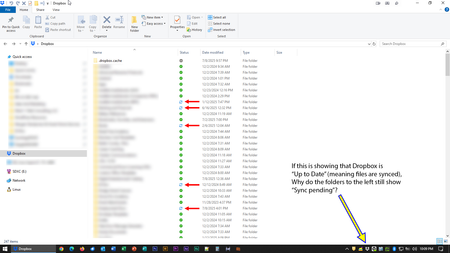
My Dropbox desktop app was updated on my Windows device. Now I can't tell if my content is synced.
OK, so the day I dreaded seems to have finally come.
Dropbox rolled out its "new appearance model" to production, bringing the end of the era of status icons overlaid on program icons and, instead,...

Jayson L.
8 months agoHelpful | Level 7
First, allow me to dispense with Rich's proposed method of attaching photos to the thread. I'm guessing he'll need to do whatever he did in the first place, here, because I still can't attach photos. You'll have to help me with that, since the option doesn't present itself. I made like I was going to start a new thread for the purposes of capturing the screen so you can see what I saw when I first began this discussion and why I chose the link option rather than the image option (that I couldn't choose).
No "Image" Option:
My Chrome version is up-to-date:
Please take a look at these and tell me how I can upload an image rather than providing links to them. Thank you.
About Apps and Installations
Have a question about a Dropbox app or installation? Reach out to the Dropbox Community and get solutions, help, and advice from members.
The Dropbox Community team is active from Monday to Friday. We try to respond to you as soon as we can, usually within 2 hours.
If you need more help you can view your support options (expected response time for an email or ticket is 24 hours), or contact us on X, Facebook or Instagram.
For more info on available support options for your Dropbox plan, see this article.
If you found the answer to your question in this Community thread, please 'like' the post to say thanks and to let us know it was useful!


