Our Community is in read-only mode until April 8th, learn more here. You can still search existing threads or get help via Dropbox Support, the Dropbox Help Center, or Learn.
Forum Discussion

Jayson L.
8 months agoHelpful | Level 7
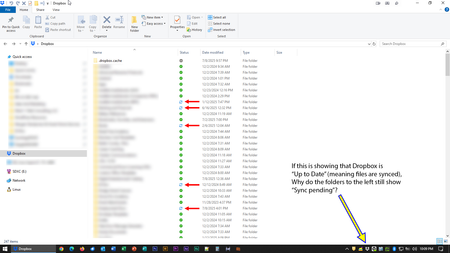
My Dropbox desktop app was updated on my Windows device. Now I can't tell if my content is synced.
OK, so the day I dreaded seems to have finally come.
Dropbox rolled out its "new appearance model" to production, bringing the end of the era of status icons overlaid on program icons and, instead,...

Jayson L.
8 months agoHelpful | Level 7
And for your web devs, this may be of interest...
- Rich8 months ago
Super User II
Jayson L. wrote:
And for your web devs, this may be of interest...
Yeah, it's likely level related. I have the option in every browser you tried.
- Walter8 months ago
Dropbox Community Moderator
Hey Jayson L. - sorry to hear you're having issues with this.
Can you update to the latest stable version from this page directly and let us know if this persists?
Note that you might need to reboot your computer as well during the process.
- Jayson L.8 months agoHelpful | Level 7
Hi, Walter. Thanks for weighing in.
I will download it and apply that update as soon as my local backup finishes. Anytime one of these nail-biters occurs, I back my current iteration of Dropbox up to my local NAS in the event something unforeseen happens. Looks like it has about 3-4 hours to go...but worth it to me.


About Apps and Installations
Have a question about a Dropbox app or installation? Reach out to the Dropbox Community and get solutions, help, and advice from members.
The Dropbox Community team is active from Monday to Friday. We try to respond to you as soon as we can, usually within 2 hours.
If you need more help you can view your support options (expected response time for an email or ticket is 24 hours), or contact us on X, Facebook or Instagram.
For more info on available support options for your Dropbox plan, see this article.
If you found the answer to your question in this Community thread, please 'like' the post to say thanks and to let us know it was useful!


