Our Community is in read-only mode until April 8th, learn more here. You can still search existing threads or get help via Dropbox Support, the Dropbox Help Center, or Learn.
Forum Discussion

Jayson L.
8 months agoHelpful | Level 7
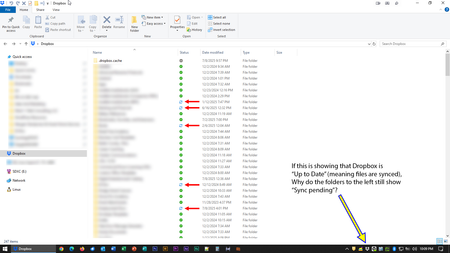
My Dropbox desktop app was updated on my Windows device. Now I can't tell if my content is synced.
OK, so the day I dreaded seems to have finally come.
Dropbox rolled out its "new appearance model" to production, bringing the end of the era of status icons overlaid on program icons and, instead,...

dbugz
8 months agoHelpful | Level 6
I too would also make an assumption that this update isn't properly checking nor displaying the actual sync status of files.
Even after updating to 228.4.5567 (Windows 10), restarting the app, and restarting, the tray icon is stuck at "Syncing "Public"" folder.
Upon checking the contents of "Public" folder, only one folder (let's call it Folder A) among the rest has a "Sync Pending" status.
Upon checking the contents of Folder A:
- Folder B (which was already set to "Make available offline" multiple times) has a status of "Sync Pending" instead of "Always available on this device"
- Checking the contents of Folder B - all items are synced and with status of "Always available on this device"
- Right-clicking on Folder B shows an option of "Make online-only"
- Folder C (which was already set to "Make available offline" multiple times) has a status of "Available when online" instead of "Always available on this device"
- Checking the contents of Folder C - all items are synced and with status of "Always available on this device"
- Right-clicking on Folder C shows an option of "Make online-only"
Given the above examples, it's pretty clear that even if you set the correct modes on folders (and supposedly their contents) it will get randomly stuck at a status that is inconsistent with its supposed sync state. The contents of the folders mentioned in the example above don't even contain large files, they're just mostly a dozen or so small office documents.
I even went ahead and exited the app, stopped DbxSvc as well, deleted the contents of .dropbox.cache, restarted DbxSvc and the app after clearing the cache - still the issue described above persists.
About Apps and Installations
Have a question about a Dropbox app or installation? Reach out to the Dropbox Community and get solutions, help, and advice from members.
The Dropbox Community team is active from Monday to Friday. We try to respond to you as soon as we can, usually within 2 hours.
If you need more help you can view your support options (expected response time for an email or ticket is 24 hours), or contact us on X, Facebook or Instagram.
For more info on available support options for your Dropbox plan, see this article.
If you found the answer to your question in this Community thread, please 'like' the post to say thanks and to let us know it was useful!


