Our Community is in read-only mode until April 8th, learn more here. You can still search existing threads or get help via Dropbox Support, the Dropbox Help Center, or Learn.
Forum Discussion

Jayson L.
8 months agoHelpful | Level 7
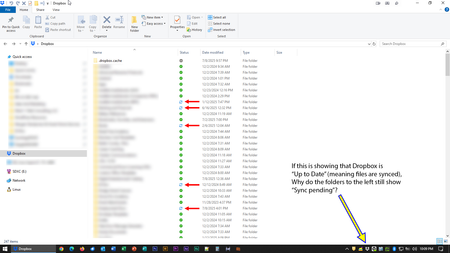
My Dropbox desktop app was updated on my Windows device. Now I can't tell if my content is synced.
OK, so the day I dreaded seems to have finally come.
Dropbox rolled out its "new appearance model" to production, bringing the end of the era of status icons overlaid on program icons and, instead,...

dbugz
8 months agoHelpful | Level 6
Anyway, moving the "affected" child folders in and out of Dropbox changed their status to "Always available on this device" - which is great, as that was the intention.
However, the parent folders still did not change their status from "Sync pending" even when the child folders were moved out, nor when they were moved back in.
Frankly, if the last resort is to opt out of the "Dropbox for Windows updates" which disables the purpose of this new update then I guess that just eliminates the need for having the said update in the first place.
I would have preferred to have been able to troubleshoot this issue more thoroughly with actual verbose logging and not just relying on what's displayed in Windows Explorer or the app's Activity Log when you right-click on the tray icon.
On another note, the said update itself should have even respected all the existing sync settings for all folders and items when it installed but instead it re-downloaded to disk all folders and items that were originally marked as "Online-only". Fortunately, there was enough physical disk space to accommodate what happened and had to redo granular sync settings, but it shouldn't have been necessary.

Jayson L.
8 months agoHelpful | Level 7
This shouldn't necessitate any material movement of folders from their original locations to function correctly. With as long as this update has been in beta, that's a facet of this production that should have been worked out prior to release to the wild.
While I won't mention publicly the solution to which I'm migrating, it doesn't offer an "online-only" option, which is precisely how I want it. I just want something that syncs across devices. I accept full and complete responsibility for ensuring that sufficient disk space exists to accommodate the data I want synced.
About Apps and Installations
Have a question about a Dropbox app or installation? Reach out to the Dropbox Community and get solutions, help, and advice from members.
The Dropbox Community team is active from Monday to Friday. We try to respond to you as soon as we can, usually within 2 hours.
If you need more help you can view your support options (expected response time for an email or ticket is 24 hours), or contact us on X, Facebook or Instagram.
For more info on available support options for your Dropbox plan, see this article.
If you found the answer to your question in this Community thread, please 'like' the post to say thanks and to let us know it was useful!


