Our Community is in read-only mode until April 8th, learn more here. You can still search existing threads or get help via Dropbox Support, the Dropbox Help Center, or Learn.
Forum Discussion

Jayson L.
8 months agoHelpful | Level 7
My Dropbox desktop app was updated on my Windows device. Now I can't tell if my content is synced.
OK, so the day I dreaded seems to have finally come.
Dropbox rolled out its "new appearance model" to production, bringing the end of the era of status icons overlaid on program icons and, instead,...

dbugz
8 months agoHelpful | Level 6
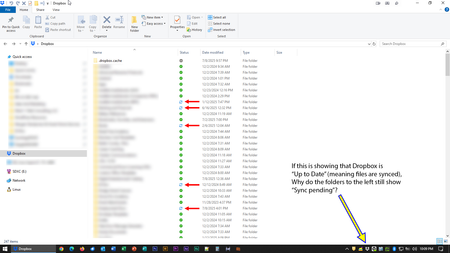
So, 2 weeks have passed and here's an update to the issue I've encountered (parent folder "Public" stuck at sync pending) - it is still stuck at that status, even when everything under it is synced.
Also, as of now, after having a few files update (all of them just a few MB in size) some of them are also now stuck at sync pending - even if they've supposedly synced as per the "Your activity" tab.
Just to point out, total number of files configured to sync on this desktop is just a little above 5K - which is significantly less than the supposed 300K+ (?) file count where the app is assumed to encounter "performance issues".
In summary, it seems to be getting worse.

Jay Dropbox Community Moderator
7 months agoDropbox Community ModeratorHi dbugz, thanks for the update. In order to look into this matter in more detail, I'd recommend contacting the support team directly for them to investigate further.
About Apps and Installations
Have a question about a Dropbox app or installation? Reach out to the Dropbox Community and get solutions, help, and advice from members.
The Dropbox Community team is active from Monday to Friday. We try to respond to you as soon as we can, usually within 2 hours.
If you need more help you can view your support options (expected response time for an email or ticket is 24 hours), or contact us on X, Facebook or Instagram.
For more info on available support options for your Dropbox plan, see this article.
If you found the answer to your question in this Community thread, please 'like' the post to say thanks and to let us know it was useful!


